
If you’ve ever stared at a screen with five open positions and realized each one has a different stop-loss (or none at all 😬)… this one’s for you. Common SL TP EA V1.51 MT5 is a lightweight, dependable trade manager that applies shared stop-loss (SL) and take-profit (TP) across all (or filtered) orders on your MetaTrader 5 terminal. Instead of babysitting every single ticket, you define one risk/target for the whole basket—clean, consistent, and way harder to mess up when volatility spikes.
No secret sauce or black-box strategy here; this EA doesn’t “predict” the market. It simply enforces disciplined exits—the part most traders skip when things get chaotic. Whether you scalp with multiple entries, swing trade a basket, or manage EAs that don’t place SL/TP by default, Common SL TP EA helps you keep the account safe and the process sane.
What Exactly Does Common SL TP EA Do? (Overview)
Common SL TP EA V1.51 MT5 is a utility/trade manager for MetaTrader 5. Its job is to synchronize risk and reward across a group of positions using your chosen rules:
- Apply one global SL and/or global TP to all open orders on a symbol.
- Filter which orders to manage by Magic Number and/or Order Comment, so it plays nicely with other EAs or manual trades.
- Optionally manage future orders as they appear—set it once and let it keep your basket consistent.
- Add quality-of-life controls like breakeven, trailing, and partial close (if you choose to use them).
The result: when the basket hits your defined stop or target, the whole thing closes out together—no stragglers, no forgotten trades, no surprise runners that wreck your day.
Who it’s for: scalpers running multi-entry sequences, grid or DCA practitioners who want a hard floor/ceiling, swing traders layering into positions, prop-firm traders who must respect daily loss rules, and anyone who needs consistent exits across mixed manual + EA flows.
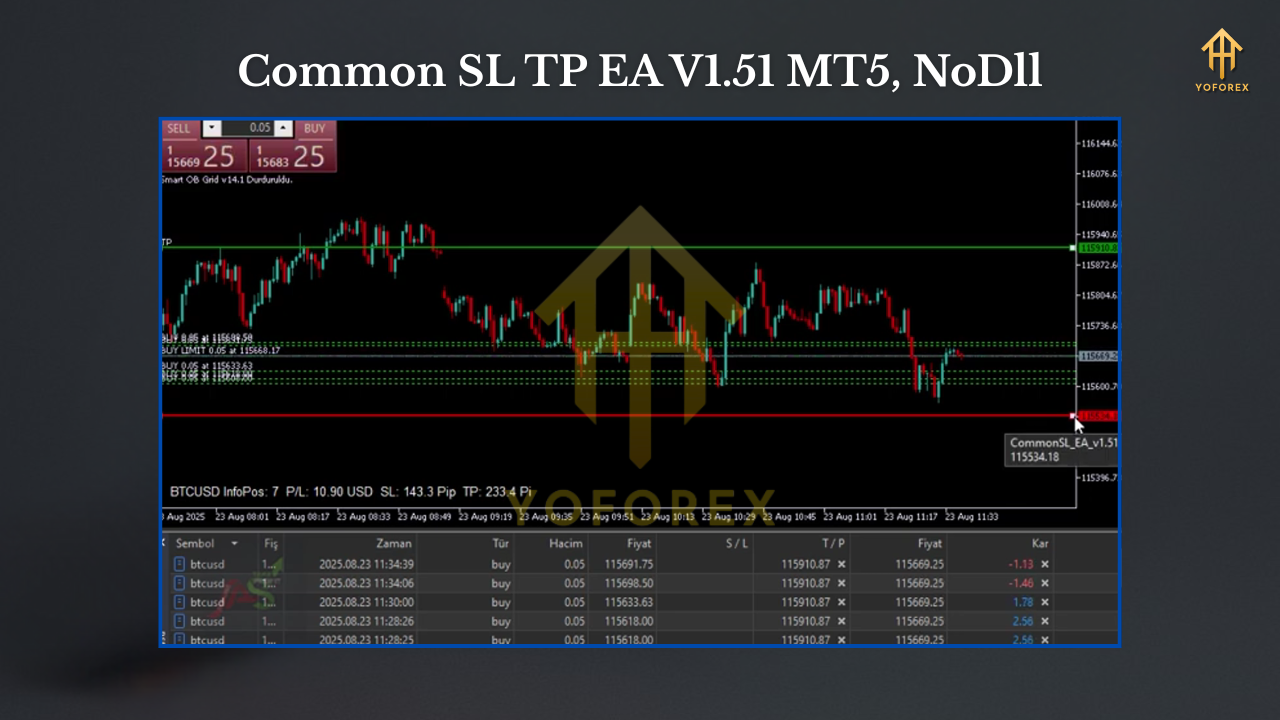
Key Features (You’ll Actually Use)
- Global Stop-Loss & Take-Profit
Define one SL/TP for the entire basket on a symbol (price or pips). When hit, all managed orders close. - Smart Filtering
Control which trades are managed by Symbol, Magic Number, and Order Comment—perfect for running multiple systems. - Attach Once, Manage Ongoing
Monitor open and newly opened trades; the EA can auto-apply your SL/TP rules as positions appear. - Breakeven & Trailing Options
Move stops to breakeven after X pips or trail by ATR/pips to protect open profit (optional, off by default). - Partial Take-Profit
Take X% off at a first target, then let the rest run to the basket TP—smooths equity curves during chop. - Equity/Balance Safety
Optional equity stop (e.g., “close all if drawdown reaches Y%”) to add a hard circuit breaker. - FIFO-friendly Behavior
Where needed, manage exits in a compliant order (useful for certain prop rules and US-style constraints). - Clean Logs & Comments
Clear on-chart labels and order comments so you can audit what happened, when, and why. - Low Overhead
Lightweight code designed to manage—not overtrade—so it plays nicely with other EAs and indicators.
How It Works (In Plain English)
- You set the rules: Choose SL/TP in pips or absolute price; add filters (symbol, magic, comment).
- EA scans your book: It finds the trades that match the filters.
- Applies exits: If orders lack SL/TP, the EA sets them. If they already have SL/TP, the EA can synchronize them to your new basket levels (configurable).
- Watches continuously: When price touches your basket SL or TP, all managed orders close together.
- Optional safeguards: Breakeven, trailing, partial close, and equity stop can add extra protection.
Recommended Setups (Use Cases)
- Scalping with Multiple Entries
You ladder into momentum with 2–5 tickets. Set a common SL below structure and common TP at your session target. When it hits—done. - Swing Baskets / DCA
You average into a swing. Set a hard basket SL (e.g., below a weekly level) and a TP around key higher timeframe targets to avoid piecemeal exits. - EA Clean-Up
Some entry EAs skip protective stops. Attach Common SL TP EA to enforce non-negotiable risk on every new trade. - Prop-Firm Guardrail
Combine equity stop with basket SL to meet daily loss rules and avoid accidental violations.
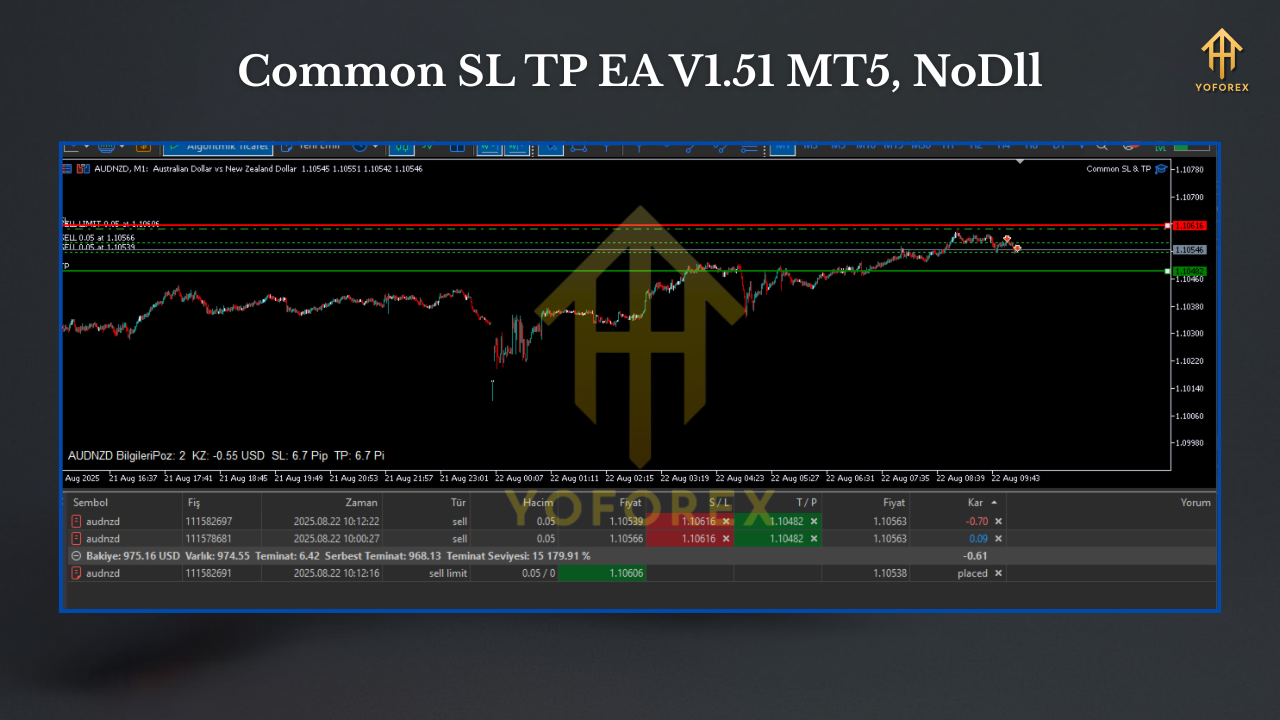
Installation & First Run (Step-by-Step)
- Copy the file: Put
Common_SL_TP_EA_v1.51.ex5into MQL5/Experts. - Restart MT5 / Refresh: Restart or right-click Experts → Refresh.
- Enable Algo Trading: Make sure the Algo/AutoTrading button is active.
- Attach to Chart: Open the chart for the symbol you want to manage (e.g., EURUSD H1) and drag the EA on.
- Set Filters: Choose Symbol scope, Magic Number(s), and Comment filter as needed.
Define Basket Levels:
- SL/TP mode: pips or absolute price (be consistent!).
- Optional: Apply to existing orders, apply to new orders, or both.
- Optional Protections: Configure breakeven, trailing, partial close, and equity stop.
- Test on Demo: Place a couple of test trades to confirm the EA tags them correctly and enforces exits as expected.
Sensible Defaults (Safe Starting Points)
- SL/TP as pips: Easiest to reason about across brokers.
- Breakeven: Off until you verify typical range; then set BE at +0.8R to +1.0R for scalping, later for swings.
- Trailing: Use ATR-based trailing for volatile instruments (gold, indices); for majors, a simple pip trail can suffice.
- Partial Close: 50% at first target (e.g., 0.8R–1.0R) to reduce variance in choppy sessions.
- Equity Stop: 3%–5% daily cap if you’re under prop-firm style rules.
Best Practices & Common Mistakes
Do:
- Match your pip/point settings to your broker’s digit format.
- Keep SL/TP rounded to sensible price levels to avoid micro triggers from spread wobbles.
- Journal a week of trades to verify the basket behavior fits your style.
Don’t:
- Mix price-based levels on one chart and pips-based on another for the same symbol (confusing!).
- Forget DST/session impacts if you pair this with time-based systems.
- Assume it will fix bad entries—this tool is a risk enforcer, not a crystal ball.
FAQ
Does it place trades by itself?
No. It manages exits for trades placed by you or other EAs.
Can it handle hedged orders?
Yes—use filters so it only touches the trades you want it to manage.
Will it conflict with my strategy EA?
Not if you filter by Magic Number and/or Comment. That’s exactly why filters exist.
Can I manage multiple symbols?
Yes—attach one instance per symbol with its own settings.
Is it prop-firm friendly?
Absolutely; use equity stops and consistent basket rules to respect daily loss limits.
Risk Disclaimer
Trading Forex/CFDs involves substantial risk. Past performance does not guarantee future results. Always test on demo or a small live account before scaling. Use this tool to enforce your plan—not to replace it.
Call to Action
Ready to simplify exits and stop babysitting tickets? Download Common SL TP EA V1.51 MT5, set your basket rules once, and trade with a calmer mind. Keep it disciplined, keep it consistent—and let the EA handle the heavy lifting.
Download: (Add your fxcracked.org download link here—use the slug below for clean SEO.)
Support: Drop questions in your post comments or reach out via your usual support channel.






Comments
Leave a Comment