
Mansa Mussa EA V1.0 MT4 – Turn Volatility Into Opportunity
In forex, missing a good setup hurts… but blowing an account with one bad EA hurts even more. If you’ve ever tried random martingale bots that doubled lots till margin cried, you already know the pain. Mansa Mussa EA V1.0 MT4 tries to sit in the middle ground: it uses martingale and scalping principles, but wraps them in a more disciplined, risk-aware framework.
Designed for popular major pairs like EURUSD, GBPUSD, USDJPY, AUDUSD, and USDCAD on M15 and H1 timeframes, this Expert Advisor aims to give you fast entries, frequent trades, and structured recovery — without going completely crazy on lot sizes. With a minimum deposit of just $100, it opens the door for small accounts to experience automated trading, while still giving enough flexibility for bigger capital and prop-style accounts.
Let’s break down how Mansa Mussa EA works, where it shines, and what you should watch out for before running it on your live money.
What Is Mansa Mussa EA V1.0 MT4?
Mansa Mussa EA V1.0 MT4 is an automated trading system (forex robot) built for the MetaTrader 4 (MT4) platform. Its main trading style is a combination of:
- Scalping – looking for short, quick moves to grab profits.
- Martingale logic – controlled increase in lot size when the market goes against the initial entry, with the intention of recovering losses once price pulls back.
The vision behind the EA is simple:
Use small, precise trades to collect regular pips… and when the market doesn’t behave, use a structured recovery logic instead of panicking or accepting a big loss.
The EA is designed to be user-friendly even if you’re not a coding person. Once attached to the chart and configured, it can run 24/5, scanning for entries, placing orders, setting stop-loss/take-profit, and handling partial or full recoveries on its own.
Trading Instruments, Timeframes & Capital Requirements
Supported Currency Pairs
Mansa Mussa EA V1.0 MT4 is optimized to work on:
- EURUSD
- GBPUSD
- USDJPY
- AUDUSD
- USDCAD
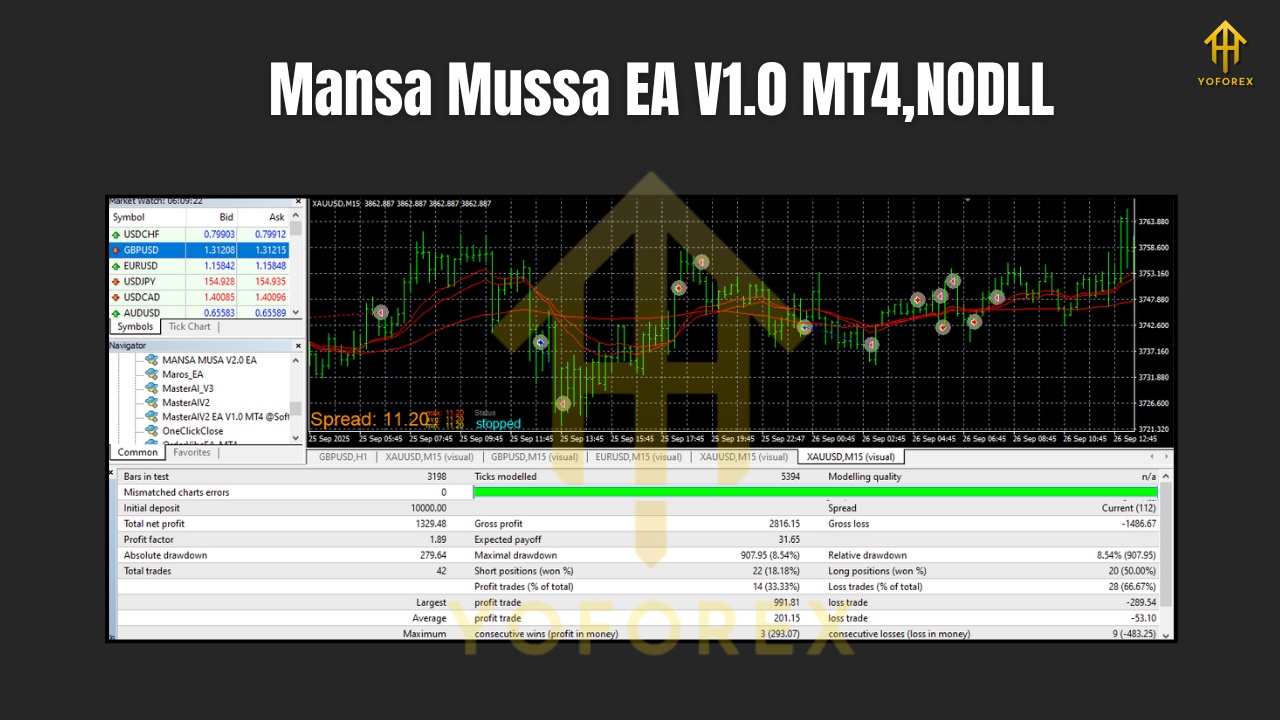
These pairs are popular, liquid, and usually have tighter spreads on most brokers. That helps a lot for scalping-style trading, where every pip and every millisecond matters.
Recommended Timeframes
The EA is designed for:
- M15 (15-minute timeframe) – more frequent signals, active trading, ideal if you like seeing regular action.
- H1 (1-hour timeframe) – slightly slower pace, smoother signals, useful for traders who don’t want too much screen noise.
You can choose one timeframe per chart. If you want to run both M15 and H1, attach the EA to separate charts for the same pair with different Magic Numbers.
Minimum Deposit
- Minimum deposit: $100
With $100, you can start using the EA on low risk settings and micro/cent account types. However, as with any martingale-style logic, more capital always gives more breathing room.
For better stability, many traders might prefer:
- $200–$300 for 1–2 pairs
- $500+ if you want to run multiple pairs comfortably
How the Strategy Works (In Simple Terms)
Mansa Mussa EA mixes trend-aware scalping with controlled martingale recovery. Here’s the rough idea:
1. Market Filtering
The EA first checks the market conditions using indicators (for example, moving averages, volatility filters, and possibly trend/oscillator confirmations). The goal is to avoid totally random entries and reduce trading in flat, choppy ranges.
- If the trend is clear and volatility is healthy, it allows trading.
- If conditions are messy, it may pause or reduce new entries.
2. Entry Logic – Small, Precise Scalps
Once conditions are met, the EA opens a base order:
- Often with a small lot size (especially on low-risk mode).
- Targets modest take profit levels (few pips to tens of pips, depending on pair and timeframe).
- Uses a predefined stop-loss so trades are always protected.
3. Recovery Logic – Controlled Martingale
If price moves against the initial trade beyond a certain distance (say, X pips):
- The EA may open an additional order with a slightly larger lot size.
- This isn’t a wild “double until destruction” martingale; done right, it’s a stepped increase meant to:
- Improve the breakeven level.
- Close the basket of trades in small net profit when price retraces.
This style can be powerful in ranging and mildly trending markets, but it will always carry higher risk in strong, one-directional moves. That’s just the truth with martingale-based systems — so money management is key.
4. Exit & Basket Closure
Once overall profit target is reached:
- The EA closes the entire basket of open trades.
- It then waits for the next fresh setup instead of overtrading.
Some versions also use trailing stop, break-even shift, or dynamic TP levels depending on volatility.
Key Features of Mansa Mussa EA V1.0 MT4
Here are the main highlights you can expect:
- Multi-pair Support
One EA that works on EURUSD, GBPUSD, USDJPY, AUDUSD & USDCAD — you can diversify across major currencies. - Designed for M15 & H1 Timeframes
Balanced between scalping frequency and trend clarity. You’re not stuck on ultra-low timeframes like M1 that depend too much on spread. - Hybrid Strategy (Martingale + Scalping)
Uses small target trades with smart recovery logic when needed, aiming to smooth out equity curves. - Fully Automated Trading
Just set up once on MT4, and the EA will watch the charts, place trades, manage stops and exits. - Risk Management Parameters
Adjustable lot size, max number of recovery steps, distance between orders, and equity/risk limitations. - Works With Small Accounts
Minimum deposit as low as $100 (though more is always safer, especially with martingale-style trading). - User-Friendly Inputs
Clean and simple settings so even non-programmers can adjust risk and behavior. - 24/5 Non-Stop Monitoring
The EA doesn’t sleep, panic, or feel greedy — it just follows the rules you set.
Risk Management & Recommended Settings
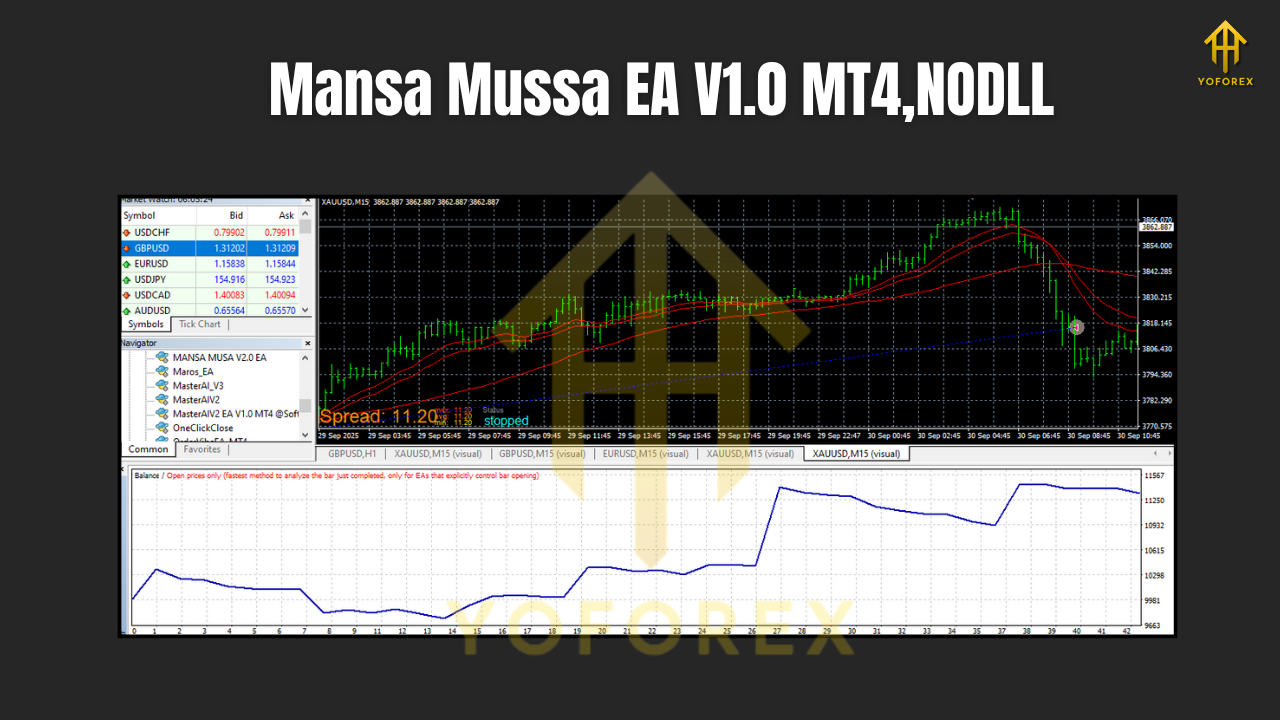
Let’s be honest: any EA that uses martingale logic is high-risk by nature. The difference between total disaster and long-term survival often comes down to position sizing, max recovery depth, and available equity.
Here are some general guidelines:
1. Start on a Demo Account
Before going live, always:
- Test the EA on demo for a few weeks.
- Try different pairs and both M15 & H1.
- Observe max drawdown, number of open trades, and how the EA behaves during news spikes.
2. Use Low Lot Sizes
For small accounts (e.g. $100–$300):
- Start with 0.01 lot as the base lot.
- Avoid increasing it aggressively until you’ve seen real behavior.
For larger accounts, you can scale lot size gradually, but avoid greed. Scaling too quickly is how martingale systems blow up.
3. Limit Max Orders / Steps
The more recovery steps allowed, the deeper the drawdown can get.
- Set a reasonable limit for maximum open orders.
- Consider cutting off recovery at a certain level and letting the basket close at a controlled loss instead of risking everything.
4. Use a VPS
If you want the EA to run reliably:
- Use a VPS so your MT4 stays online 24/5.
- Stable internet + low latency to your broker = smoother trade execution.
5. Avoid High-Impact News (If Possible)
Martingale + high volatility news = dangerous combo.
- Either pause the EA before big events like NFP, CPI, FOMC etc.
- Or reduce the number of pairs running during those periods.
Who Is Mansa Mussa EA For?
Mansa Mussa EA V1.0 MT4 is a good fit if:
- You understand the risk of martingale and still want structured automation.
- You like active trading on M15 or H1 with multiple majors.
- You want to grow a small account (starting from $100) but are prepared for volatility in equity.
- You prefer having the option to control risk via settings rather than using a black-box AI that hides everything.
It may NOT be ideal if:
- You want ultra-conservative, low-drawdown investing.
- You hate seeing multiple open positions or floating drawdown.
- You are unwilling to monitor or adjust settings as market conditions change.
How to Install & Run Mansa Mussa EA on MT4
If you’re new to MT4 EAs, here’s a quick setup walkthrough:
- Download the EA file (.ex4 or .mq4)
Save it on your PC. - Open MT4 → File → Open Data Folder
Go to:MQL4 → Experts. - Paste the EA File
Copy the Mansa Mussa EA file into the Experts folder. - Restart MT4
Close and reopen your MT4 terminal so it loads the new EA. - Enable Auto Trading
- Click the “AutoTrading” button on the toolbar (make sure it’s green).
- Also go to:
Tools → Options → Expert Advisorsand allow algorithmic trading.
6. Open Charts for Supported Pairs
- EURUSD, GBPUSD, USDJPY, AUDUSD, USDCAD
- Set timeframe to M15 or H1.
7. Attach EA to Chart
- From the Navigator → Expert Advisors list, drag “Mansa Mussa EA V1.0” onto the chart.
- Set your lot size, risk settings, max trades, and other options in the Inputs tab.
8. Check Smiley Face / Status
- If everything is set correctly, you’ll see a smile icon (or active EA icon) in the corner of the chart.
- Now the EA is live and will trade based on its logic.
Always monitor in the first few days to ensure everything runs as expected.
Final Thoughts
Mansa Mussa EA V1.0 MT4 is not a magic money printer — no honest EA is. What it does offer is a structured, logic-based way to combine scalping entries with martingale-style recovery, especially on popular major pairs and practical timeframes like M15 and H1.
With a low minimum deposit of $100, flexible risk settings, and fully automated operation, it can be a powerful ally for traders who:
- Respect risk,
- Understand martingale pros and cons,
- And are willing to test, tweak, and manage expectations.
Run it on demo, dial in the parameters, and only then move to live with money you can genuinely afford to risk. Trade smart, not just fast.






Comments
Leave a Comment