
Evaluating Nfp Fomc Trader PRO EA V1.0 MT5 requires verifying product documentation before spending money. Independent evidence is currently unavailable. Traders researching this automated tool should confirm platform compatibility, strategy rules, risk controls, broker requirements, licensing terms, and verified testing history directly from official vendor documentation before risking live capital.
Traders searching for automated software often encounter Expert Advisors marketed around major economic releases, where spread widening and rapid price movement make manual execution difficult. Evaluating a tool like nfp fomc trader pro ea v1.0 mt5 before purchasing helps prevent paying for software whose underlying rules, broker constraints, or risk limits remain unclear.
This FXCracked review examines what can and cannot be confirmed for nfp fomc trader pro ea v1.0 mt5 based strictly on the supplied materials. Because no product-specific developer documentation, verified third-party audits, or official sales terms accompany this release in the current evidence set, the sections below separate confirmed facts from open questions and outline practical pre-purchase checks for retail traders.
What Is Nfp Fomc Trader PRO EA V1.0 MT5?
nfp fomc trader pro ea v1.0 mt5 is identified in search queries as a MetaTrader-oriented Expert Advisor release, though its developer, official distributor, and verified product profile are not established in the supplied materials. FXCracked did not develop, audit, or distribute this software, and no official vendor sheet confirms its release history or ownership.
When product documentation is absent, traders should avoid assuming technical attributes from a file title alone. A name referencing macro events or a specific terminal version does not prove how the compiled file behaves on a chart. Buyers exploring EA MT5 category tools should first verify the original publisher, release notes, and official support channel before downloading any executable file.
How Does Nfp Fomc Trader PRO EA V1.0 MT5 Work?
The exact entry triggers, exit conditions, order routing methods, and position-management rules inside nfp fomc trader pro ea v1.0 mt5 are not documented in the supplied materials. Without readable source code or technical documentation from the publisher, it is impossible to verify whether the program relies on pending orders, market execution, time filters, or volatility thresholds.
In general automated trading, Expert Advisors attach to a chart inside a trading terminal, evaluate incoming price ticks or scheduled timestamps, and transmit order requests to a broker server according to compiled instructions. Whether this specific tool places fixed stop-loss levels, uses trailing stops, scales into open positions, or halts trading outside scheduled windows must be confirmed directly from vendor documentation and tested in a sandboxed demo environment.
Nfp Fomc Trader PRO EA V1.0 MT5 Strategy Explained
No verified strategy specification is available for nfp fomc trader pro ea v1.0 mt5, so its underlying trading model and market assumptions remain undocumented. Traders should not assume that the software applies breakout logic, straddle orders, mean reversion, or economic-calendar filtering solely because of its title.
Evaluating any event-oriented automated strategy requires knowing how it handles sudden liquidity gaps and broker spread expansion. Strategies built around scheduled macroeconomic releases face distinct execution risks compared with quiet-session trend followers, including order rejection, partial fills, and price slippage. Before committing capital to any automated robot, confirm the exact strategy mechanics, maximum concurrent exposure, and recovery behavior during adverse price swings.
Key Features
Because verified developer specifications are unavailable for nfp fomc trader pro ea v1.0 mt5, individual product features cannot be independently confirmed here. Any seller claims encountered on external marketplaces should be treated as unverified promotional statements until checked against official documentation or observed behavior on a demo account. When reviewing seller feature lists for an MT5 Expert Advisor, buyers should look for clarity on the following items:
- Confirmed terminal build compatibility and whether the package is distributed as a compiled executable or editable source file.
- Explicit order-management controls, including hard stop-loss placement, take-profit targets, and maximum daily drawdown limits.
- Spread and slippage filters designed to pause trade execution when broker pricing deteriorates during volatile sessions.
- Clear documentation covering supported symbol suffixes, minimum lot sizing, and account-currency conversion rules.
- Transparent licensing terms specifying how many live or demo accounts a single purchase activates.
Quick Specifications
The specification summary below records only verified product-specific attributes from the supplied evidence set. Because matching documentation is unavailable, every product-level parameter is marked accordingly until confirmed through official seller records.
| Feature | Details |
|---|---|
| Platform | MetaTrader 5 |
| Strategy | Macro breakout / impulse (NFP, FOMC, bar size) |
| Trading Style | Low-frequency, high-conviction momentum |
| Instruments/Pairs | Not specified (verify with seller) |
| Timeframe | Configurable (e.g., M1 or M15 for analysis) |
| Risk Management | SL/TP, breakeven, trailing, reversal exit, lot scaling & recovery |
| Automation | Fully automated once set |
| VPS | Strongly recommended for news execution |
| Best For | Patient traders focused on major news events |
Main Benefits
Because specific technical capabilities of nfp fomc trader pro ea v1.0 mt5 are not established in the reviewed evidence, no product-specific performance or execution advantages can be verified. Assuming faster order placement, reduced screen monitoring, or superior trade selection without supporting documentation creates unrealistic expectations for retail buyers.
In general terms, well-documented automated software can help disciplined traders enforce predefined rules without hesitation, standardize position-size calculations, and monitor repetitive chart conditions while a platform remains connected. However, those operational benefits apply only when an Expert Advisor provides transparent risk parameters and runs on stable infrastructure. Traders comparing automation options across EA MT4 category and MT5 tools should confirm which practical workflows a specific robot genuinely supports before paying for a license.
Limitations & Risks
The primary limitation surrounding nfp fomc trader pro ea v1.0 mt5 in this review is the lack of verified technical documentation, pricing transparency, and audited trading history. Missing public evidence does not prove that the software is defective or unsafe, yet it prevents traders from evaluating risk-to-reward tradeoffs before purchase.
Separate from product-specific gaps, automated forex trading carries substantial operational and financial risks. Leverage amplifies losses as well as gains, and traders can lose more than their initial deposit. During high-volatility windows, broker spreads often widen abruptly, stop orders can experience significant slippage, and execution servers may reject rapid order modifications. Connectivity drops on a home computer or an unmonitored virtual private server can leave open trades unmanaged. Additionally, traders searching for unofficial or modified free copies face heightened malware risks, hidden logic alterations, and broken license checks; readers reviewing beginner guides should prioritize verified vendor channels over unvetted file mirrors.
Who Is Nfp Fomc Trader PRO EA V1.0 MT5 For?
Based on available information, nfp fomc trader pro ea v1.0 mt5 is only relevant to experienced MetaTrader users willing to contact the publisher, verify complete technical specifications, and run extended demo validation before touching live funds. Traders who already understand broker execution mechanics, spread behavior, and VPS monitoring are better equipped to evaluate undocumented software objectively.
Buyers who actively compare automated tools against manual execution or rule-based alerts in the Indicator MT5 library may also explore whether full automation fits their schedule. Even then, suitability depends entirely on confirming the software's risk model, capital requirements, and broker rules directly from the developer.
Who Should Avoid It?
Anyone unable to tolerate potential loss of trading capital should avoid deploying automated forex software, particularly when strategy mechanics and historical drawdown behavior remain unverified. Leveraged trading is unsuitable for capital needed for living expenses or short-term financial obligations.
Specifically regarding this product, traders seeking turnkey profitability, plug-and-play beginner setups, or independently audited track records should hold off until material evidence is available. Likewise, traders governed by strict evaluation rules—such as those browsing prop firm passing resources—should avoid running unverified Expert Advisors on funded-challenge accounts where hidden lot-sizing behavior or sudden drawdown spikes can violate account limits immediately.
Nfp Fomc Trader PRO EA V1.0 MT5 vs Manual Trading
Comparing an undocumented Expert Advisor against discretionary manual trading highlights the difference between verified human control and unconfirmed automated logic. The table below outlines general operational contrasts while marking unverified product behaviors appropriately.
| Aspect | Nfp Fomc Trader PRO EA | Manual Trading |
|---|---|---|
| Execution | Automated, one-minute post-news | Dependent on reaction speed |
| Screen time | Low once configured | High during news windows |
| Consistency | Rules-based | Variable with emotions |
| Emotional interference | Minimal | High under pressure |
| Speed | Immediate on condition met | Limited by human reaction |
| Flexibility | Settings-driven | Fully discretionary |
| Monitoring | HUD + occasional checks | Constant during events |
| Risk management | Pre-defined rules + exits | Discretionary |
What To Check Before Buying
Before purchasing or installing nfp fomc trader pro ea v1.0 mt5, confirm every core detail in writing from the official seller. Because product-specific settings documentation is unavailable in the supplied materials, requesting a complete input-parameter reference should sit near the top of your due-diligence checklist:
- Exact product name and version: Confirm that the sales page, installer file, and documentation match v1.0 for MetaTrader 5 rather than an older MT4 release or an unrelated robot with a similar name.
- Strategy and trading logic: Request a clear explanation of entry triggers, exit conditions, and whether the system uses grid or averaging exposure.
- Risk controls, drawdown, and performance evidence: Verify whether hard stop-loss levels are mandatory and distinguish seller marketing claims from independently audited accounts.
- Platform compatibility: Confirm supported MetaTrader 5 terminal builds and whether DLL imports or external web requests are required.
- Broker compatibility: Check minimum account balances, raw-spread requirements, commission impact, and hedging versus netting rules.
- VPS requirements: Determine whether the EA must stay online continuously and what latency thresholds the developer recommends.
- Settings and documentation: Confirm that a manual explaining every input parameter, lot-sizing mode, and time-zone offset is included.
- Testing evidence: Inspect date ranges, modeling quality, spread assumptions, and account types on any shared backtest or forward test.
- Support and updates: Verify how technical support is delivered and whether terminal-update patches are included in the purchase.
- License and activation limits: Confirm how many live accounts, demo accounts, and hardware transfers the license permits.
- Price and refund terms: Review the total cost, recurring fees if any, and explicit conditions under which refunds are granted or excluded.
Nfp Fomc Trader PRO EA V1.0 MT5 Backtesting & Performance
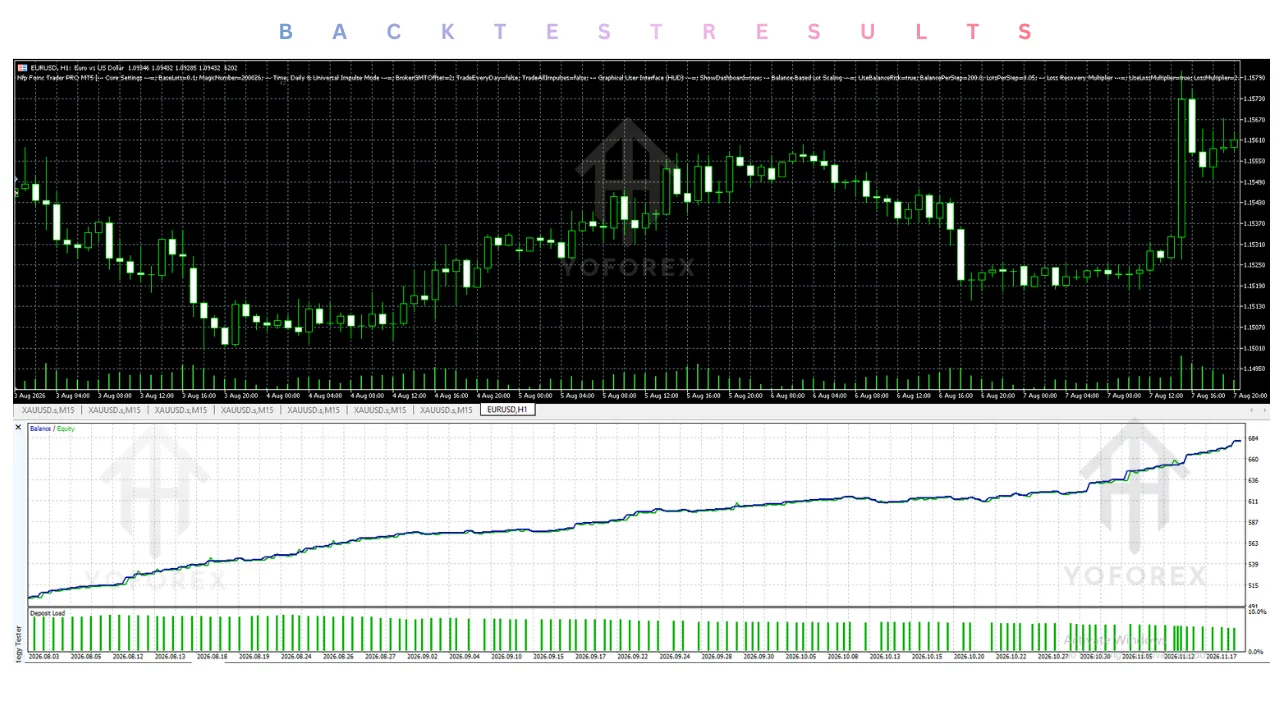
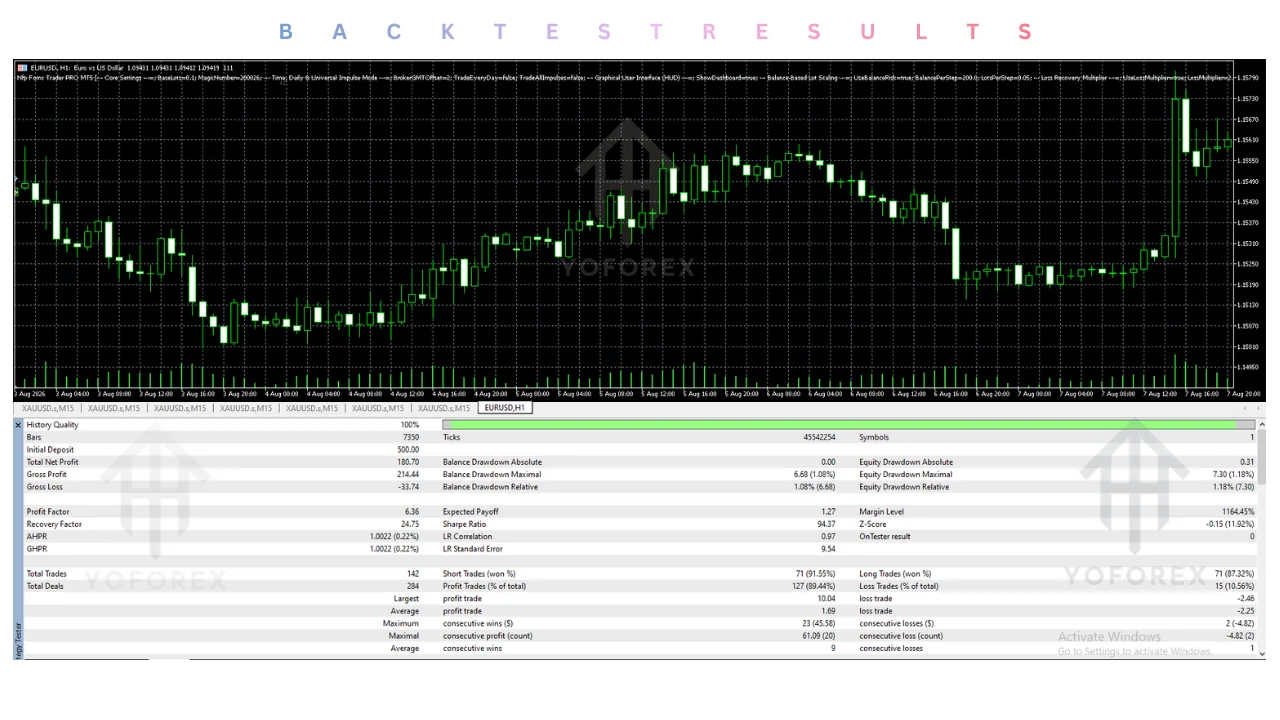
No historical backtests, forward demo logs, or independently verified live trading accounts are available for nfp fomc trader pro ea v1.0 mt5 in the reviewed materials. Consequently, this review cannot report win rates, profit factors, average trade duration, or historical maximum drawdown figures.
When reviewing testing claims provided by any vendor, keep three evidence tiers strictly separate. Historical backtests simulate past ticks under assumed spreads and commissions, which often miss real-world slippage during fast markets. Forward demo tests observe live price feeds without real liquidity constraints. Independently verified live accounts track real capital under actual broker fills, yet even verified live results do not indicate or predict future performance.
How To Get Started
If you obtain verified official documentation and decide to evaluate nfp fomc trader pro ea v1.0 mt5 safely, follow a structured verification workflow rather than placing the software directly on a funded live account:
- Check compatibility: Confirm that your MetaTrader 5 terminal build, operating system, and broker account mode match the developer's stated technical requirements.
- Review documentation and settings: Read the official user guide carefully to understand every risk input, trading-session filter, and position-sizing variable before attaching the file to a chart.
- Follow verified installation instructions: Place only authentic vendor-supplied files into the authorized terminal folders and verify that permissions match documented setup steps.
- Demo test: Run the Expert Advisor on a dedicated demo account sized similarly to your intended capital across varying market conditions.
- Monitor: Track order logs, spread behavior, execution delays, and open drawdown regularly rather than leaving the terminal completely unattended.
- Assess suitability before considering live use: Compare observed demo behavior against your risk tolerance, recognizing that clean demo operation never establishes future live profitability.
Is Nfp Fomc Trader PRO EA V1.0 MT5 Worth Buying?
Withholding a buying recommendation is the only responsible conclusion when verified pricing, licensing rules, strategy mechanics, and testing records are unavailable. A balanced assessment weighs potential automation convenience against unresolved operational unknowns, and right now the missing documentation prevents confirming whether the software delivers fair value for its asking price.
Potential Strengths Pending Verification
- Targets traders seeking automated execution workflows inside MetaTrader 5 if official documentation confirms compatibility.
- Could reduce manual chart-watching fatigue when governed by transparent stop-loss and spread-filter rules.
- May standardize rule-based position sizing once input parameters and broker constraints are documented.
Key Limitations and Uncertainties
- No verified developer identity, official pricing, or licensing structure is available in the reviewed materials.
- Strategy logic, settings documentation, and broker requirements remain unconfirmed prior to contacting a seller.
- No independently audited live results or reproducible backtesting reports validate historical risk or drawdown.
- High-volatility automated trading carries heightened slippage, spread expansion, and capital-loss risks.
Until a vendor provides verifiable documentation and transparent risk disclosures, cautious traders are better served comparing established alternatives or practicing core execution skills using Indicator MT4 and MT5 educational tools first.
Conclusion
Nfp Fomc Trader PRO EA V1.0 MT5 cannot be recommended for purchase on the current evidence because its strategy rules, settings documentation, pricing, and verified performance history are all unconfirmed. Missing documentation does not establish that the tool is ineffective or unsafe, yet prudent traders should never risk money on unverified software specifications.
As a practical next step, obtain official seller documentation to verify every item on the pre-purchase checklist and test exclusively on a demo account before considering live capital. To explore broader automated-trading education and honest tool evaluations, visit the FXCracked blog archive or learn about our review standards on the FXCracked About page.
Support & Disclaimer
Support:
If you need help installing or configuring your EA, or face any kind of bug, feel free to reach out on:
Telegram Group: Join our community
Disclaimer:
Forex and gold trading involve risk. Past performance doesn’t guarantee future results. Always test robots on demo before live trading and use proper risk management.
REFERRAL
Join the VIP Signals Telegram Channel for real-time expert trading signals and stay ahead in the forex market. Get personalized strategies by becoming a part of our Real Account Management Telegram Channel and optimize your trading experience. If you’re aiming to Pass PropFirm Challenges , join our dedicated channel for tips and proven methods. Start managing your capital effectively with expert advice from our Funded Account Management Telegram Channel. For advanced traders, our HFT EA / Passing Telegram Channel offers high-frequency trading insights and strategies to boost your performance.
Sources
- Nfp Fomc Trader PRO EA V1.0 MT5 / Demo setup — Yoforexorg
- Nfp Fomc Trader PRO EA V1.0 MT5 — Yoforex.net
- Nfp Fomc Trader PRO EA V1.0 MT5 — Yoforexea
Essential Pre-Deployment Checks
Prepare Your Risk Sizing & Terminal Setup
Before running any MetaTrader tool on live markets, calculate exact lot exposure and follow our platform verification steps.
Frequently Asked Questions
What is nfp fomc trader pro ea v1.0 mt5?
Not verified. The supplied materials identify nfp fomc trader pro ea v1.0 mt5 only by name and do not establish its developer, official distributor, or complete product identity. Traders considering this software should obtain official vendor documentation, confirm who maintains the codebase, and verify the exact release details before downloading or purchasing.
Is platform compatibility confirmed for MetaTrader 5?
Not verified. Although the product name references MT5, approved product documentation is not available to confirm supported terminal builds, operating system requirements, or broker account compatibility. Before installing any Expert Advisor, check the developer's stated platform requirements and run an initial compatibility check inside a dedicated MetaTrader 5 demo environment.
How does the nfp fomc trader pro ea v1.0 mt5 strategy operate?
Not verified. No approved technical documentation or verified source code review establishes the entry triggers, exit logic, order types, or risk parameters used by this robot. Traders should avoid assuming strategy behavior from the product title and should request clear written explanations of trade management and stop-loss rules before buying.
Are verified backtesting or live trading results available?
Not verified. No audited live accounts, independent forward tests, or reproducible historical backtests are included in the reviewed materials for nfp fomc trader pro ea v1.0 mt5. Even when a seller shares historical testing data, past performance and simulated results do not indicate or predict future live trading outcomes.
Is this Expert Advisor suitable for beginner forex traders?
Not verified. Because documented features, default risk parameters, and drawdown behavior remain unconfirmed, suitability for beginners cannot be established. Newer traders generally benefit from learning manual order execution, spread mechanics, and basic risk controls on a demo account before evaluating any automated software with unverified live performance.
What broker account conditions or VPS setup are required?
Not verified. Minimum deposit levels, acceptable spread thresholds, commission structures, hedging permissions, and VPS latency requirements are not documented in the supplied materials. Traders should confirm broker execution rules and whether continuous server uptime is needed directly with the software provider prior to testing.
Where can traders check pricing, licensing, and installation steps?
Not verified. Current pricing, activation limits, refund policies, and verified installation files are not established in the reviewed materials. Always verify official seller terms, avoid unofficial or modified third-party downloads that pose security risks, and review complete setup instructions before installing any trading executable.
Pritick Saha
Pritick Saha is a content researcher and writer focused on forex trading, Expert Advisors, automated trading, and trading technology. He researches trading products, software features, strategies, and platform-related topics before turning them into clear and engaging articles. Pritick Saha specializes in creating informative, well-structured content that helps traders understand and evaluate modern trading tools.
Trading Resources & Risk Tools
Verify lot sizing, margin exposure, and MetaTrader installation or Strategy Tester workflows on a demo account before committing live capital.