
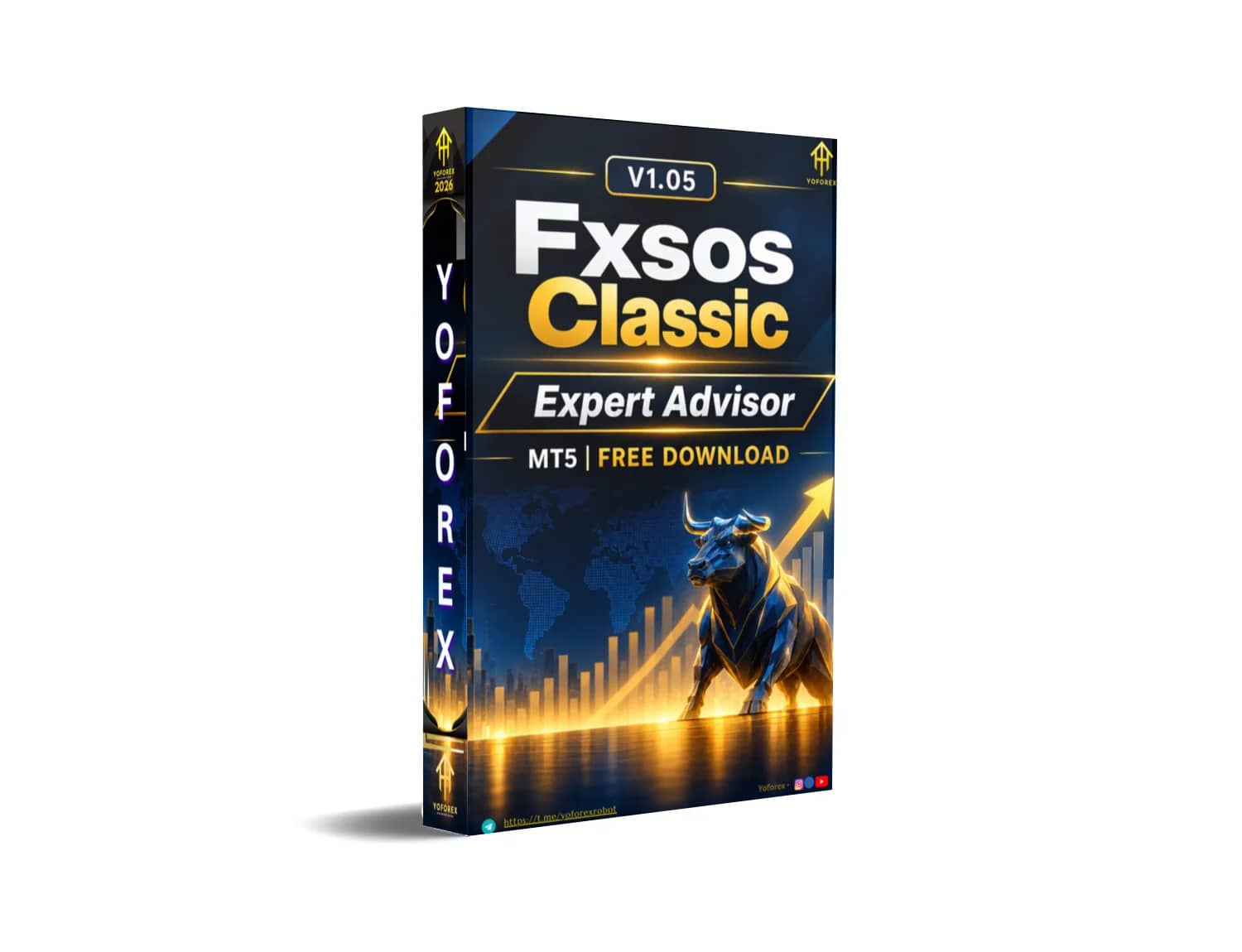
Fxsos Classic EA V1.05 MT5 remains unverified. Supplied documentation does not confirm the developer, trading logic, settings, licensing, or price for this software. Before paying or running any third-party file, traders should request official documentation, confirm platform compatibility, and evaluate behavior carefully on a demo account.
Traders searching for fxsos classic ea v1.05 mt5 often want quick answers on how the robot trades, which inputs it uses, and whether a demo setup or commercial license makes sense. Finding reliable technical records for niche or version-numbered Expert Advisors can be difficult when third-party listings omit developer histories, verified account statements, or complete parameter manuals.
This FXCracked buyer guide examines what available documentation actually establishes and separates confirmed facts from unverified gaps. Because the single independent comparison reference available during research covers unrelated trading tools rather than this specific build, product-specific specifications remain undocumented here, making pre-purchase verification essential before installing or buying any file.
What Is Fxsos Classic EA V1.05 MT5?
fxsos classic ea v1.05 mt5 is an Expert Advisor label associated with automated forex trading inquiries, though its exact developer, publisher, and official product documentation are not established in the supplied material. Without verified vendor records, buyers cannot confirm whether version 1.05 represents an active commercial release, a legacy software build, or a third-party repackaged archive.
Treating a product name or version tag as proof of capability can mislead buyers. Until an official developer page confirms authorship, release notes, and distribution rights, this software should be approached as an undocumented trading tool rather than a verified commercial system.
How Does Fxsos Classic EA V1.05 MT5 Work?
At a category level, automated forex Expert Advisors execute trade entries, modifications, and exits automatically inside a connected trading terminal according to coded rules. Well-documented robot libraries typically outline entry rules, exit filters, and risk controls alongside installation steps and product-specific limitations.
For fxsos classic ea v1.05 mt5 specifically, however, the internal workflow is undocumented in available records. Neither the signal generation trigger, order sizing formula, stop-loss placement method, nor exit management sequence has been confirmed. Prospective users should request a full technical manual from the seller before running any compiled file, and those comparing automated systems can browse our EA MT5 category for broader context.
Fxsos Classic EA V1.05 MT5 Strategy Explained
The underlying trading strategy and market assumptions used by fxsos classic ea v1.05 mt5 are not documented in the supplied sources. In transparent robot documentation, publishers explain rule-based trading approaches and filters so users understand whether a system relies on trend following, breakout triggers, mean reversion, or grid scaling.
Because no confirmed strategy specification exists here, traders cannot assume which market sessions, volatility regimes, or currency pairs this version targets. Never infer strategy logic from words like "classic" in a title; verify the actual trade rules with the distributor first.
Key Features
Because direct vendor documentation for fxsos classic ea v1.05 mt5 is unavailable, no product-specific feature claims can be confirmed independently. Comparing typical MetaTrader robot listings illustrates the difference between general category capabilities and unconfirmed items buyers must still verify:
- Automated order handling: In general, MetaTrader Expert Advisors place and close orders automatically without manual clicks once attached to a chart.
- Configurable parameters: Documented MT5 libraries commonly provide configurable inputs and risk controls that traders adjust inside the terminal before testing.
- Built-in tester workflow: Compatible MT5 robots allow users to run historical simulations in Strategy Tester and inspect sample reports prior to demo deployment.
- Product-specific filters (unconfirmed): Whether fxsos classic ea v1.05 mt5 includes news filters, spread caps, trailing stops, or drawdown cutoffs remains unconfirmed.
- Licensing and update support (unconfirmed): Official account locks, terminal build support, and ongoing update commitments are not established for this release.
Quick Specifications
The table below summarizes the verified specification status for fxsos classic ea v1.05 mt5 based strictly on matching product-specific records, avoiding assumptions derived from the keyword or unrelated software listings.
| Feature | Details |
|---|---|
| Platform | MetaTrader 5 |
| Strategy | Fibonacci-based trading cycles with position additions |
| Trading Style | Aggressive cycle-based growth |
| Instruments/Pairs | Primarily gold (GOLD / XAUUSD recommended) |
| Timeframe | M5 recommended |
| Risk Management | Margin-based load parameter; no hard stop-loss percentage claimed |
| Automation | Fully automated entries and management once attached |
| VPS | Terminal or VPS must stay running and connected |
| Best For | Traders allocating separate risk capital for aggressive gold cycles |
| Account Type | Native Hedged account required |
| Price (MQL5 listing) | 1,000 USD purchase; rental options available |
Main Benefits
When an Expert Advisor is properly documented by its developer, automated execution can help traders apply consistent rules without manually entering every order. In well-structured MT5 environments, traders can review example reports and test settings in a historical simulator before evaluating live-market behavior on a demo account.
Still, those potential workflow advantages apply only when clear documentation and verified code exist. Without confirmed specifications for fxsos classic ea v1.05 mt5, buyers should not assume faster execution, reduced monitoring time, or superior returns compared with manual trading. Readers exploring platform fundamentals can review our Beginner guides before testing any automation tool.
Limitations & Risks
Evaluating an undocumented Expert Advisor requires separating general automated-trading hazards from product-specific gaps. Every automated forex system faces market drawdown, changing volatility regimes, widening spreads, execution slippage, and connectivity interruptions when local hardware or hosting fails. As independent software comparisons note, trading carries capital loss risk and historical backtests never ensure future returns.
Beyond market mechanics, distribution origin poses a critical risk. Many free Expert Advisors circulated online lack adequate security screening and can expose trading terminals or broker accounts to unauthorized behavior, hidden code changes, or sudden malfunctions. For fxsos classic ea v1.05 mt5 specifically, missing developer attribution, unconfirmed stop-loss logic, and absent third-party verification make unvetted downloads risky to run near real funds.
Traders comparing legacy MetaTrader builds or specialized tools should also examine our EA MT4 category and Prop firm passing resources to understand how strict drawdown rules interact with unverified robots.
Who Is Fxsos Classic EA V1.05 MT5 For?
Until full product documentation is verified, fxsos classic ea v1.05 mt5 is relevant primarily for experienced automated traders who know how to audit unknown software safely. Suitable evaluators are comfortable requesting official vendor specs, checking configuration inputs and licensing terms, running isolated Strategy Tester diagnostics, and supervising a demo terminal over several weeks.
Experienced users who already maintain sandboxed testing environments and strict position-sizing habits are better positioned to investigate whether an obscure build matches their broker conditions. Even then, thorough due diligence must precede any real-capital commitment.
Who Should Avoid It?
Traders who cannot tolerate financial loss should avoid deploying unverified trading software altogether, since automated trading exposes capital to loss even under documented rules. Beginners who do not yet understand lot sizing, margin calls, spread costs, or MT5 Strategy Tester limitations should likewise step back from undocumented files.
Anyone seeking hands-off passive income, strict prop-firm drawdown compliance, or plug-and-play simplicity without verifying code safety should skip unconfirmed downloads. Given warnings that unsecured free EAs risk account safety, running unverified builds on a funded account is unsuitable for cautious retail traders.
Fxsos Classic EA V1.05 MT5 vs Manual Trading
Comparing an undocumented Expert Advisor against discretionary manual trading highlights where verified behavior is still missing versus how human execution operates. Regardless of method, leveraged currency trading involves risk and neither automation nor manual decision-making removes market uncertainty.
| Aspect | Fxsos Classic EA | Manual Trading |
|---|---|---|
| Execution | Automated once conditions met | Fully discretionary |
| Screen time | Lower once running, but monitoring still needed | High |
| Consistency | Follows programmed rules | Subject to trader discipline |
| Emotional interference | Reduced on entry decisions | High risk of emotion-driven mistakes |
| Speed | Fast reaction to programmed signals | Limited by human reaction time |
| Flexibility | Fixed to its Fibonacci cycle logic | Fully adaptable |
| Monitoring | Still required (connection, exposure, restarts) | Continuous |
| Risk management | Margin load parameter + manual oversight | Entirely trader-defined |
What To Check Before Buying
Before paying for any license or installing a downloaded archive labeled fxsos classic ea v1.05 mt5, complete a structured verification checklist with the seller or official distributor. Because trading risks include full capital loss and product-specific settings documentation is currently unavailable, confirm every item below in writing first:
- Exact product name and version: Verify that the build number (v1.05) matches an official changelog from the named creator.
- Strategy and trading logic: Request a clear explanation of entry triggers, exit conditions, and whether grid or martingale sizing is used.
- Risk controls, drawdown, and performance evidence: Confirm maximum stop-loss behavior, equity protection rules, and independently audited track records.
- Platform compatibility: Verify exact MetaTrader 5 build requirements rather than relying on the title alone.
- Broker compatibility: Check minimum account balances, leverage assumptions, hedging versus netting rules, and spread sensitivity.
- VPS requirements: Determine whether continuous 24/5 execution requires low-latency hosting and confirm acceptable ping thresholds.
- Settings and documentation: Obtain a full parameter guide; verified settings documentation is presently unavailable in supplied records.
- Testing evidence: Review raw Strategy Tester settings, date spans, modeling quality, and forward demo logs.
- Support and updates: Confirm active developer contact channels and compatibility updates when terminal builds change.
- License and activation limits: Check how many demo or live accounts a single purchase covers and whether hardware locks apply.
- Price and refund terms: Confirm total cost, recurring fees if any, and explicit refund eligibility before checkout.
Fxsos Classic EA V1.05 MT5 Settings
The supplied sources do not provide verified product-specific settings information. No confirmed input names, default lot multipliers, stop-loss distances, take-profit targets, or time-filter parameters appear in available documentation for fxsos classic ea v1.05 mt5.
When reviewing any comparable automated system, well-prepared product guides outline configuration inputs, filters, and risk controls so traders understand how each parameter alters exposure. Before testing this version on demo, request the official `.set` files or parameter glossary from the vendor and inspect every risk-sizing input before enabling automated trading.
Fxsos Classic EA V1.05 MT5 Backtesting & Performance
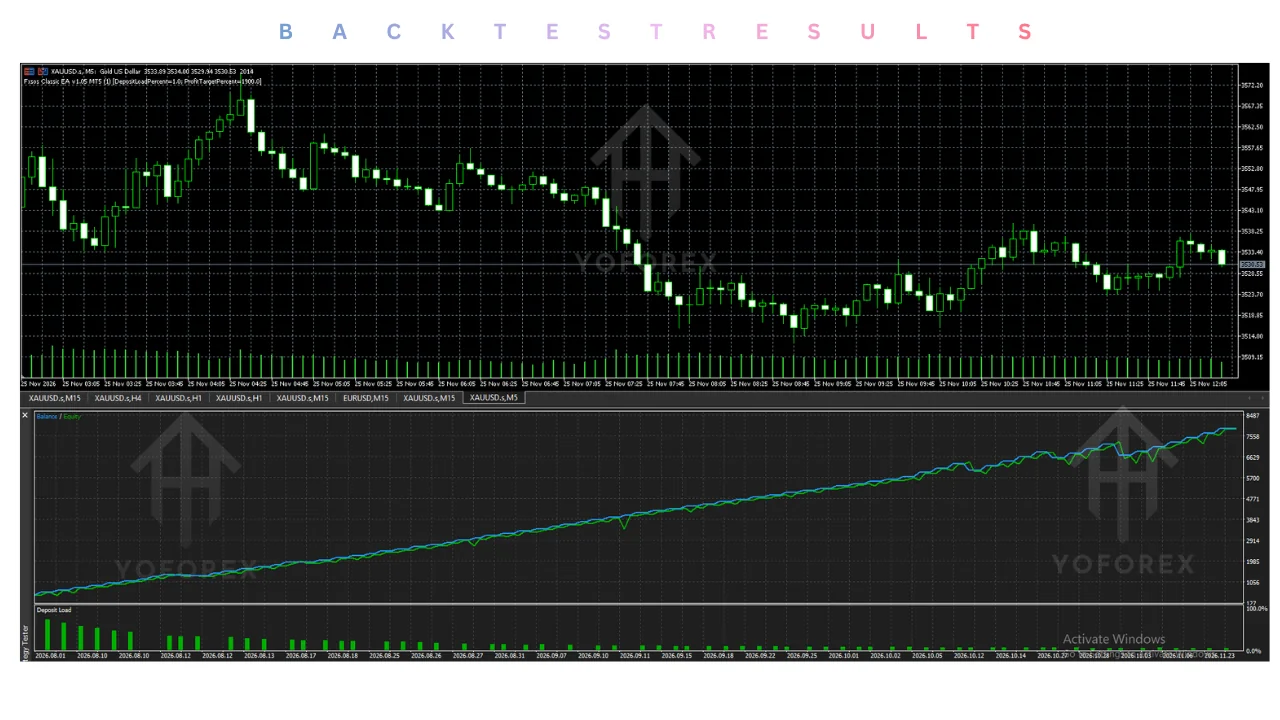
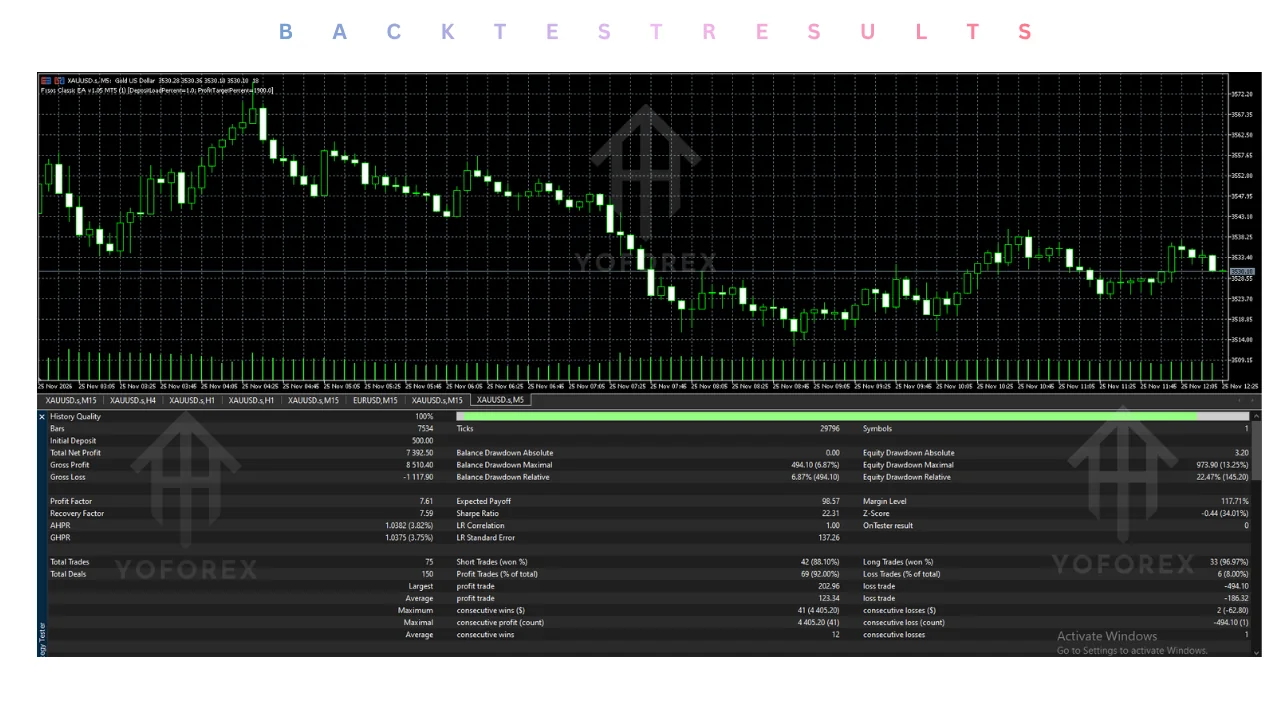
No verified historical backtests, forward demo statements, or independently audited live performance records exist in the supplied material for fxsos classic ea v1.05 mt5. Without raw test data, claims about win rate, profit factor, or maximum drawdown cannot be substantiated.
When evaluating future vendor-supplied metrics, separate historical simulations, forward demo logs, and live audited accounts clearly. While MT5 users can examine backtesting and optimization educational principles in a Strategy Tester, simulated curves depend heavily on spread, commission, and slippage assumptions. Always treat historical results cautiously, because past performance does not ensure future outcomes under live liquidity.
How To Get Started
If you obtain official documentation and a verified license from a legitimate seller, follow a cautious evaluation workflow rather than rushing straight to live capital. As documented in standard MT5 EA evaluation practices, traders should test configurations safely in a non-live environment before risking funds:
- Check compatibility: Confirm operating system support, exact MetaTrader build requirements, and broker account mode.
- Review documentation and settings: Read the official parameter guide, strategy summary, and licensing terms completely.
- Follow verified installation instructions: Use only official installation files and instructions supplied directly by the verified developer.
- Demo test: Run historical Strategy Tester diagnostics and forward-test the robot on a demo account using realistic spreads.
- Monitor: Track open trades, margin usage, slippage, and unexpected error messages in the terminal journal regularly.
- Assess suitability before considering live use: Compare observed demo drawdown against your risk tolerance before deciding whether live micro-lot testing makes sense.
Is Fxsos Classic EA V1.05 MT5 Worth Buying?
A buying recommendation for Fxsos Classic EA V1.05 MT5 must be withheld because material evidence covering the developer, strategy logic, configuration inputs, pricing, and verified performance is missing. Without confirmed documentation, paying for a license or trusting an unvetted download introduces avoidable technical and financial uncertainty.
Verified Considerations vs. Documented Gaps
- Potential workflow upside (general EA category): Documented automated trading robots execute rules consistently and can be tested in MT5 Strategy Tester prior to live exposure.
- Clear evaluation path: Buyers who obtain official vendor manuals can audit risk inputs safely on a demo account before committing capital.
- Missing product identity & specs: Authorship, platform confirmation, trading strategy, settings, license rules, and price remain undocumented.
- No verified performance record: Zero audited live results or verified backtest datasets are available to evaluate drawdown or profitability.
- Third-party file risk: Running unsecured free Expert Advisors online can compromise trading account security and operational stability.
Conclusion
Fxsos Classic EA V1.05 MT5 currently lacks the verified developer records, strategy documentation, parameter guides, pricing transparency, and audited testing needed for an informed purchase decision. While automated systems can simplify rule execution when properly documented, unknown builds carry substantial risk if installed without verification.
Your safest next step is to request complete official documentation directly from the named vendor and avoid unverified third-party downloads. To explore documented automation guides and educational robot reviews, browse our latest FXCracked articles or review our MT5 Expert Advisor guides.
Support & Disclaimer
Support:
If you need help installing or configuring your EA, or face any kind of bug, feel free to reach out on:
Telegram Group: Join our community
Disclaimer:
Forex and gold trading involve risk. Past performance doesn’t guarantee future results. Always test robots on demo before live trading and use proper risk management.
REFERRAL
Join the VIP Signals Telegram Channel for real-time expert trading signals and stay ahead in the forex market. Get personalized strategies by becoming a part of our Real Account Management Telegram Channel and optimize your trading experience. If you’re aiming to Pass PropFirm Challenges , join our dedicated channel for tips and proven methods. Start managing your capital effectively with expert advice from our Funded Account Management Telegram Channel. For advanced traders, our HFT EA / Passing Telegram Channel offers high-frequency trading insights and strategies to boost your performance.
Sources
- Fxsos Classic EA V1.05 MT5 / Demo setup — Yoforexorg
- Fxsos Classic EA V1.05 MT5 — Yoforex.net
- Fxsos Classic EA V1.05 MT5 — Yoforexea
Essential Pre-Deployment Checks
Prepare Your Risk Sizing & Terminal Setup
Before running any MetaTrader tool on live markets, calculate exact lot exposure and follow our platform verification steps.
Frequently Asked Questions
What is fxsos classic ea v1.05 mt5?
Verified product identity records for fxsos classic ea v1.05 mt5 are Not verified in the supplied research. Neither the original developer nor an official vendor changelog appears in public listings. While automated trading software places trades systematically, buyers should confirm exact authorship before downloading any executable file.
Which trading platform supports fxsos classic ea v1.05 mt5?
Platform compatibility for fxsos classic ea v1.05 mt5 is Not verified. Although the keyword references mt5, buyers should never assume MetaTrader 5 build support from a filename alone. As noted in comparable EA platform documentation, developers target specific terminals and operating systems that must be confirmed directly.
How does the fxsos classic ea v1.05 mt5 trading strategy operate?
The entry rules, filters, and exit logic for fxsos classic ea v1.05 mt5 are Not verified. Well-documented robot libraries publish strategy logic and risk controls alongside specific product limitations. Until a verified manual describes how this build manages positions, its internal trading behavior remains unknown to prospective buyers.
Are backtesting or live results available for fxsos classic ea v1.05 mt5?
Verified backtesting, forward testing, and live account performance for fxsos classic ea v1.05 mt5 are Not verified. Even when vendors supply historical reports from a strategy tester, historical results never guarantee future trading outcomes. Always inspect spread assumptions, date ranges, and independent account tracking before risking capital.
Is fxsos classic ea v1.05 mt5 suitable for beginner traders?
Beginner suitability for fxsos classic ea v1.05 mt5 is Not verified because documented settings and risk limits are unavailable. Automated trading still exposes funds to loss, and unvetted free expert advisors online can create serious account security hazards. Newcomers should study automated risk management on demo accounts first.
What broker or VPS requirements apply to fxsos classic ea v1.05 mt5?
Broker restrictions, minimum deposit thresholds, spread limits, and VPS specifications for fxsos classic ea v1.05 mt5 are Not verified. Generally, automated systems modify and close positions continuously whenever markets are open, so traders must confirm execution conditions, latency sensitivity, and hosting requirements directly with the seller before deployment.
Where can traders verify licensing, pricing, and installation steps?
Official pricing, licensing terms, refund policies, and verified installation files for fxsos classic ea v1.05 mt5 are Not verified. Because installation, licensing, and product documentation vary across robot developers, traders should obtain written license terms from an official vendor and verify file integrity before installing anything.
Pritick Saha
Pritick Saha is a content researcher and writer focused on forex trading, Expert Advisors, automated trading, and trading technology. He researches trading products, software features, strategies, and platform-related topics before turning them into clear and engaging articles. Pritick Saha specializes in creating informative, well-structured content that helps traders understand and evaluate modern trading tools.
Trading Resources & Risk Tools
Verify lot sizing, margin exposure, and MetaTrader installation or Strategy Tester workflows on a demo account before committing live capital.