

ROFIKNUR EA V1.00 MT4: Automate Grid Entries When You Can’t Sit at the Charts All Day
The Problem Traders Face
Many traders know a clear set of rules for ranging markets—place layers at fixed pip distances, scale size only after a few levels, target a modest take-profit, and let the grid recover—but they cannot watch the charts continuously. Work, sleep, and life interrupt. Manual execution of every grid level becomes inconsistent. Missed entries, emotional lot increases, or late exits destroy the edge the rules were supposed to deliver.
What makes this difficult is the combination of repetitive decision-making and the need for 24/5 availability. Automation looks attractive because it can open, manage, and close positions according to fixed parameters without requiring the trader to stay glued to the screen. The right Expert Advisor must support dual-direction trading, configurable grid spacing, delayed lot scaling, time filters, and clear installation on MT4 so the trader can verify behavior on demo before risking capital.
ROFIKNUR EA V1.00 MT4 is positioned as one such tool for traders who want that rules-based automation.
Can ROFIKNUR EA V1.00 MT4 Help With This?
Yes. ROFIKNUR EA V1.00 MT4 is a fully automated MetaTrader 4 Expert Advisor that runs a dual-direction grid strategy with delayed martingale scaling. It opens both Buy and Sell positions, spaces them at a default 20-pip step, applies lot multipliers only from the third level onward, and targets approximately 20 pips per trade (or optional USD/percentage global targets). Time filtering restricts activity to chosen broker hours. Presets (Buy.set and Sell.set) allow separate charts for each direction.
It addresses the monitoring problem by executing the entire cycle—entry, scaling, and profit targeting—without manual intervention once configured. Traders who already understand grid and martingale mechanics, who trade ranging conditions, and who can accept equity swings while the grid recovers are the most likely to benefit. The EA is reported to work on EUR/USD on the M15 timeframe as well as its primary focus of USDJPY on H4; parameters can be adjusted for the pair and chart period chosen.
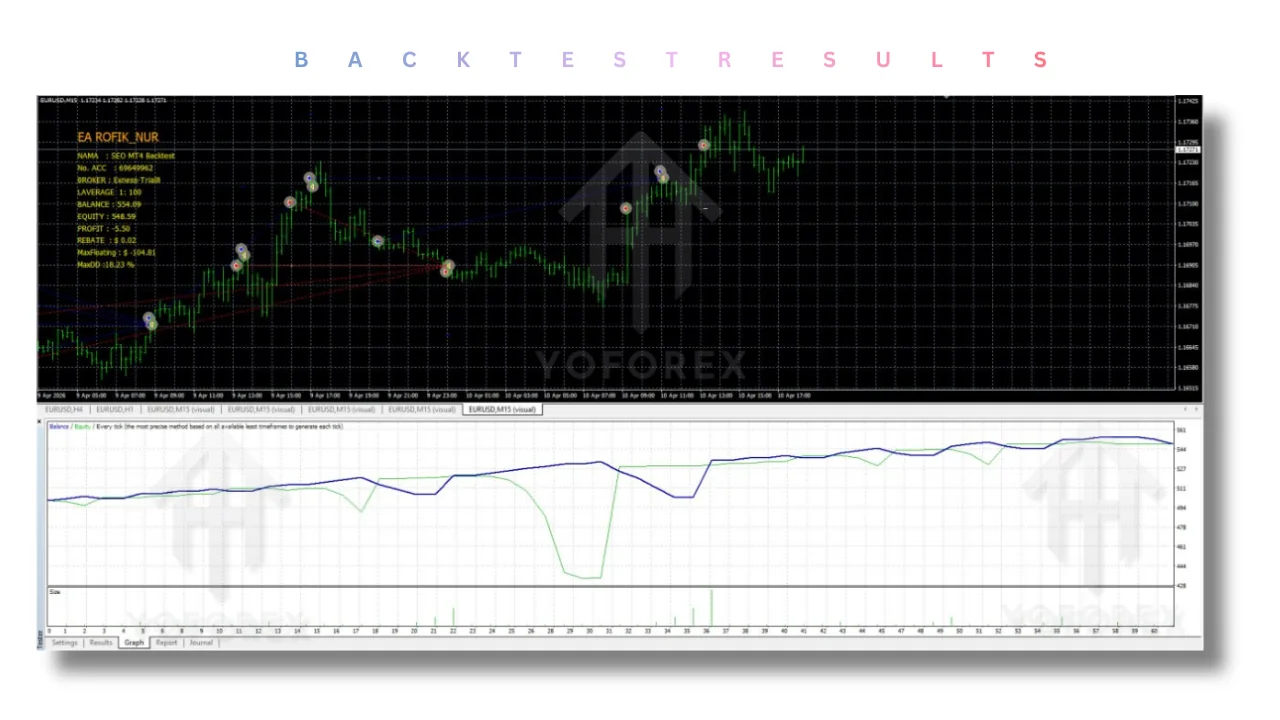
How the Bot Solves the Problem
Continuous chart watching → Automated dual-direction grid execution → Positions open and close according to the loaded settings without the trader being present. Repetitive manual lot decisions → Delayed multiplier starting at level 3 → Scaling only after initial levels, reducing early over-exposure while still recovering. Inconsistent session timing → Built-in time filter → Trading limited to the hours the trader prefers. Need for MT4 automation on major pairs → Compatible with MT4 (Build 1440+ recommended) and configurable for EUR/USD M15 or USDJPY H4 → One platform, documented presets, no DLL required in the fixed version.
The practical benefit is that the trader can load the EA, apply the appropriate set file, enable AutoTrading, and step away while still following the predefined rules.
Quick Product Snapshot
Factor Details Platform MetaTrader 4 (MT4, Build 1440+ / 1471+ recommended) Strategy Dual-direction grid with delayed martingale recovery Trading Style Grid / mean-reversion oriented for ranging conditions Pairs Primary: USDJPY; also works on EUR/USD (and other ranging pairs with parameter adjustment) Timeframe Primary recommendation H4; also works on M15 (and other periods) Automation Fully automated entries, scaling, and profit targeting Risk Management No default per-trade stop-loss; global USD/% equity controls available; Max Buy/Sell limits (default 20 each) Configuration Lots 0.01 start, Multiplier from level 3, Step 20 pips, TakeProfit ~20 pips, time filter, Magic number Best For Traders familiar with grid/martingale who need hands-off execution and can monitor equity
Key Features Relevant to the Problem
| Factor | Details |
|---|---|
| Platform | MetaTrader 4 (MT4, Build 1440+ / 1471+ recommended) |
| Strategy | Dual-direction grid with delayed martingale recovery |
| Trading Style | Grid / mean-reversion oriented for ranging conditions |
| Pairs | Primary: USDJPY; also works on EUR/USD (and other ranging pairs with parameter adjustment) |
| Timeframe | Primary recommendation H4; also works on M15 (and other periods) |
| Automation | Fully automated entries, scaling, and profit targeting |
| Risk Management | No default per-trade stop-loss; global USD/% equity controls available; Max Buy/Sell limits (default 20 each) |
| Configuration | Lots 0.01 start, Multiplier from level 3, Step 20 pips, TakeProfit ~20 pips, time filter, Magic number |
| Best For | Traders familiar with grid/martingale who need hands-off execution and can monitor equity |
Dual Buy & Sell Logic with Separate Presets Opens long and short grids simultaneously (up to 20 positions per side). Matters because ranging markets move both ways; one chart + one set file for each direction keeps the system balanced without the trader switching manually. Verify: Load Buy.set and Sell.set on two separate charts and confirm both directions activate only within the time filter.
Delayed Lot Multiplier (from Level 3) Starts at fixed 0.01 lots; multiplier (default 2.0 secondary) engages only after the third order. Matters because early grid levels stay small, limiting initial exposure while still allowing recovery later. Verify: Check the AtLevelMultiplier and Multiplier2 inputs and back-test or forward-test the scaling behavior.
Fixed Grid Step + Pip Take-Profit Default 20-pip spacing and ~20-pip TP per trade (optional USD or % global close). Matters for consistent, rules-based exits that do not rely on the trader’s real-time judgment. Verify: Confirm Step and TakeProfit values match the pair’s typical range on the chosen timeframe (EUR/USD M15 or USDJPY H4).
Time Filter Restricts new trades to user-defined broker hours. Matters for traders who want the bot active only during preferred sessions and inactive during high-news or low-liquidity periods. Verify: Set StartHour/EndHour and observe that no new orders open outside that window.
Magic Number & Max Position Caps Unique Magic for identification; hard limits on Buy and Sell counts. Matters for running the EA alongside other systems or protecting margin. Verify: Assign a unique Magic and test that position counts never exceed the Max_BUY / Max_SELL settings.
Practical Use Case
A trader who works standard daytime hours cannot watch EUR/USD or USDJPY charts continuously. They load ROFIKNUR EA V1.00 MT4 on an M15 EUR/USD chart with the Buy preset and a second H4 USDJPY chart with the Sell preset (or both pairs on matching timeframes). They set the time filter to their preferred session, leave the default 20-pip step and delayed multiplier, enable AutoTrading on a demo account, and let the EA place and manage the grid. After several weeks of observing equity swings, drawdown, and recovery speed, they decide whether the behavior matches their risk tolerance before any live capital is used.
Where ROFIKNUR EA V1.00 MT4 May Help
- Frees time that would otherwise be spent watching for grid levels.
- Delivers consistent rule execution (spacing, delayed scaling, TP) without emotional interference.
- Supports both EUR/USD M15 and USDJPY H4 configurations with the same core logic.
- Allows separate Buy and Sell charts plus time filtering for controlled automation.
- Provides clear input parameters so the trader can adjust risk before going live.
Where It May Not Help
- It cannot eliminate market risk or guarantee profitable results.
- Default settings include no fixed per-trade stop-loss; equity can experience large drawdowns (reported historical ranges have been high) during prolonged trends against the grid.
- It is not a set-and-forget system for beginners who do not understand martingale exposure.
- Performance depends on broker conditions (spreads, execution, leverage) and may require a VPS for uninterrupted operation.
- It still requires the trader to monitor overall equity, adjust parameters, and decide when to stop or restart.
Who Should Consider Buying ROFIKNUR EA V1.00 MT4?
Experienced MT4 users who already trade or understand grid and delayed-martingale strategies, prefer automation over discretionary entries, have limited chart time, are comfortable with equity volatility, and can run a demo test on EUR/USD M15 or USDJPY H4 before live use.
Who Should Avoid Buying It?
Anyone expecting guaranteed profits, traders unwilling to test thoroughly on demo, those who cannot tolerate high equity drawdowns, beginners who do not yet grasp grid recovery risk, or anyone whose strategy requires strict per-trade stop-losses or a completely different approach (pure trend-following, high-frequency scalping without grid, etc.).
Problem-Solution Comparison
| Trading Need | Manual Approach | ROFIKNUR EA V1.00 MT4 |
|---|---|---|
| Monitoring | Continuous chart watching | Automated once attached and enabled |
| Execution | Trader places every grid level | EA opens/closes according to settings |
| Consistency | Subject to fatigue and emotion | Fixed rules (step, delayed multiplier) |
| Automation | None | Full dual-direction grid + time filter |
| Configuration | Mental or written checklist | Inputs + Buy.set / Sell.set presets |
| Human Intervention | Required for every decision | Mainly for equity oversight and restarts |
Before purchasing:
- Confirm MT4 compatibility (Build 1440+ recommended).
- Understand the grid + delayed-martingale strategy.
- Check supported pairs (EUR/USD and USDJPY among others).
- Confirm timeframe flexibility (M15 and H4 both usable).
- Review risk settings (no default SL, Max positions, multipliers).
- Review any available drawdown information from live signals.
- Confirm broker compatibility (ECN/raw preferred by many users).
- Check VPS requirements for 24/5 uptime.
- Review all input parameters and the supplied set files.
- Plan a full demo test period.
- Check seller support and update policy.
- Verify the package contains the .ex4 and both set files.
How to Get Started
- Review the full product specifications and input list.
- Confirm your MT4 build, broker, and account size meet the suggested minimums (commonly ~$1,000 and 1:100+ leverage).
- Purchase from a trusted source if the fit is confirmed.
- Install the EA file into the MT4 Experts folder and restart the terminal.
- Attach to charts (EUR/USD M15 and/or USDJPY H4), load the corresponding Buy.set or Sell.set, and configure time filter and risk inputs.
- Enable AutoTrading and run exclusively on a demo account first.
- Monitor equity, open positions, recovery speed, and any unexpected behavior for a meaningful period.
- Only consider live deployment after you are satisfied with the demo results and have a clear risk plan.
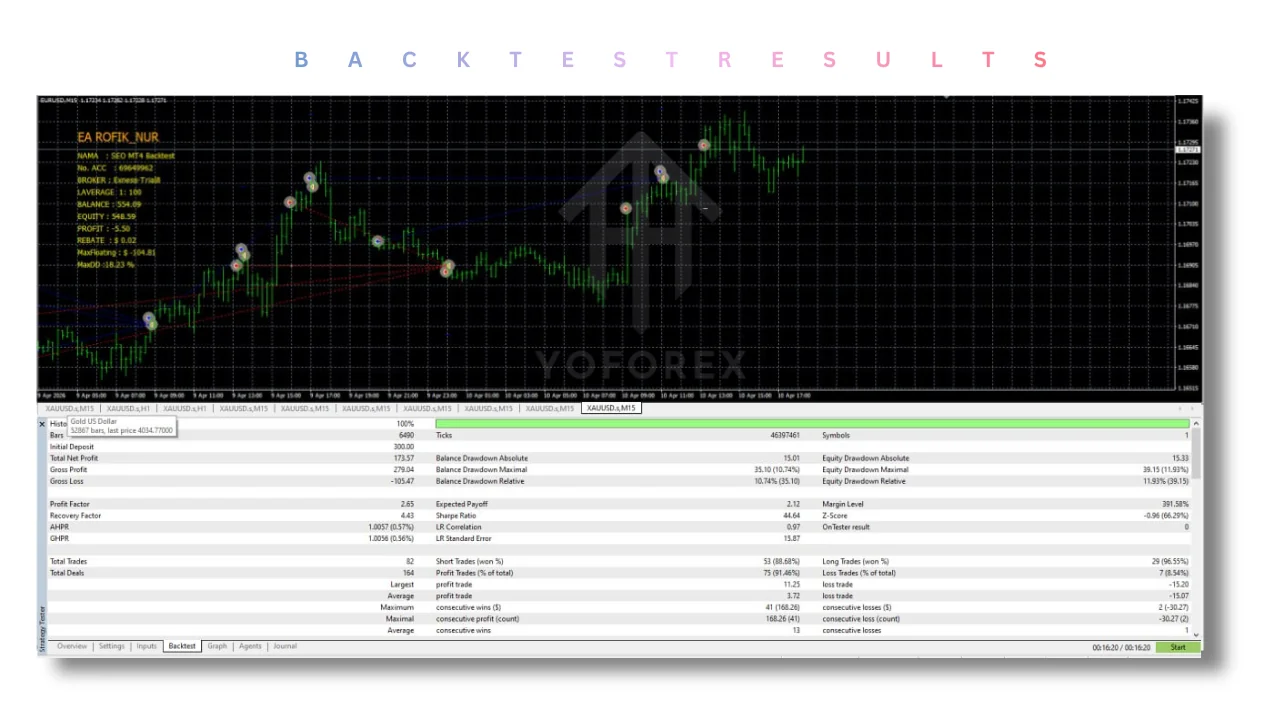
FAQs
Can ROFIKNUR EA V1.00 MT4 automate this trading approach?
Yes. It automates dual-direction grid placement, delayed lot scaling from level 3, and profit targeting once the settings and presets are loaded.
Is ROFIKNUR EA compatible with my MT4 setup?
It is built for MetaTrader 4 (Build 1440+ / later builds commonly supported). Confirm the exact build and that your broker allows EAs.
Is the bot suitable for beginners?
It is better suited to traders who already understand grid and martingale risk. Beginners should treat it as a learning tool on demo only.
Can I test it before live trading?
Yes. Always test thoroughly on a demo account with the exact pair, timeframe (EUR/USD M15 or USDJPY H4), and settings you intend to use.
What should I check before buying?
Strategy fit, pair/timeframe compatibility, risk parameters (especially no default SL), package contents, seller support, and your own willingness to monitor equity.
Does it require a VPS?
A VPS is recommended for uninterrupted 24/5 operation, especially if your local computer cannot stay online.
Can settings be customized?
Yes. All major parameters (lots, multipliers, step, TP, time filter, max positions, Magic) are adjustable. Presets provide starting points.
Where can I purchase ROFIKNUR EA V1.00 MT4?
From the product pages on the sites that distribute the official or fixed unlimited version with set files (check current listings on the brand and related EA marketplaces).
CONCLUSION
If ROFIKNUR EA V1.00 MT4 matches your need for automated grid execution on EUR/USD M15 or USDJPY H4 and you are prepared to test and manage the associated risk, review the full specifications, confirm compatibility, and get started with a demo installation.
Buy ROFIKNUR EA V1.00 MT4 | View Bot | Check Specifications | Get Started
Never risk capital you cannot afford to lose. Past results, including any reported live performance, do not guarantee future outcomes.
REFERRAL
Join the VIP Signals Telegram Channel for real-time expert trading signals and stay ahead in the forex market. Get personalized strategies by becoming a part of our Real Account Management Telegram Channel and optimize your trading experience. If you’re aiming to Pass PropFirm Challenges , join our dedicated channel for tips and proven methods. Start managing your capital effectively with expert advice from our Funded Account Management Telegram Channel. For advanced traders, our HFT EA / Passing Telegram Channel offers high-frequency trading insights and strategies to boost your performance.
Shirley Johnson
Kimberly Hill
Never miss a market crack.
Join 15,000+ traders receiving our weekly breakdown of elite tools and strategies.
No spam. Just high-impact trading insights.