
Unleash Precision Trading with the ATR HiLo TT Indicator MT4
Introduction
Traders everywhere know the frustration: you spot a potential move, you pull the trigger, then boom… the market whipsaws you out of your position. What if there was a way to harness market volatility and let it guide your entries and exits? Enter the ATR HiLo TT Indicator MT4—a dynamic, volatility-driven trend tool designed to cut through the noise and keep you riding winners. By combining the power of the Average True Range (ATR) with a HiLo trailing-stop mechanism (the TT in its name), this indicator paints clear trend zones on your MetaTrader 4 charts. In this in-depth guide, you’ll learn what makes the ATR HiLo TT Indicator MT4 tick, why it could become your go-to trend companion, and how to put it to work in your trading.
What Is the ATR HiLo TT Indicator MT4?
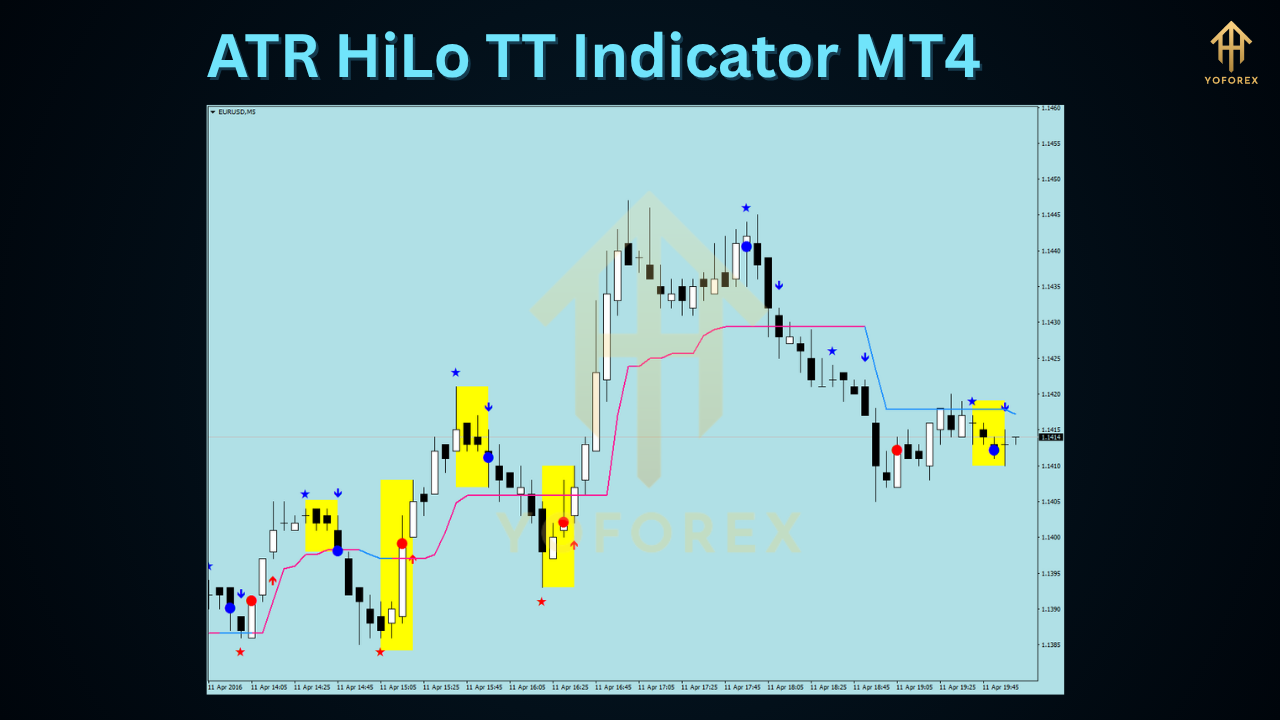
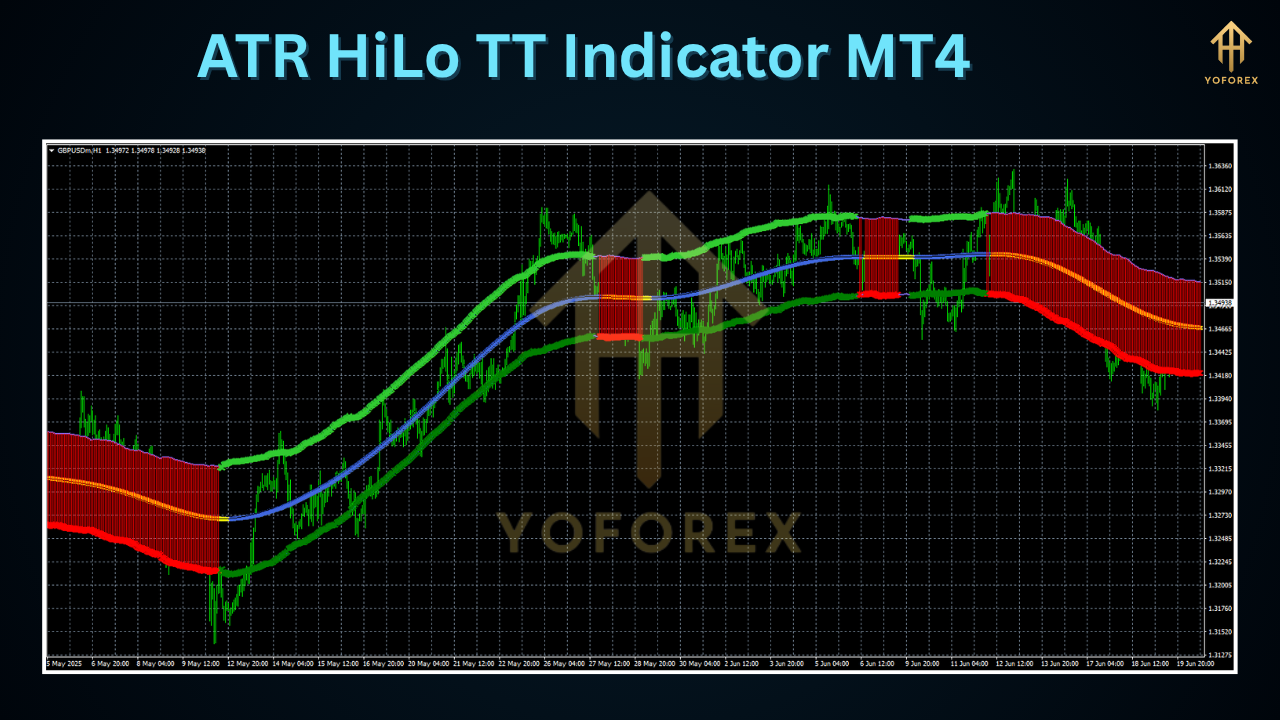
At its core, the ATR HiLo TT Indicator MT4 blends two proven concepts: ATR and HiLo trailing stops. ATR is a gauge of market volatility—it measures how far price moves over a given period. The HiLo TT component then uses those volatility readings to draw dynamic bands above and below price, adjusting in real time to market conditions. When price closes above the upper band, an uptrend is signaled; when it closes below the lower band, you’re potentially seeing a downtrend. Those bands also act like trailing stops—locking in gains and reducing drawdown as the trend unfolds. What you get is a single, intuitive overlay that shows you where to ride the trend and where to bail if things reverse.
How It Works
-
ATR Calculation
-
The indicator calculates the Average True Range (ATR) over a user-defined period (commonly 14 bars).
-
ATR values reflect recent volatility—when the market is choppy, ATR rises; when it’s calm, ATR falls.
-
-
Band Construction
-
Two bands are plotted: an upper band (price plus ATR×multiplier) and a lower band (price minus ATR×multiplier).
-
Traders typically use an ATR multiplier between 2 and 4; higher values smooth out noise but can lag signals.
-
-
HiLo Trailing-Stop (TT) Logic
-
The HiLo TT component updates on each new bar. If the trend is bullish, the lower band shifts upward but never down; if bearish, the upper band shifts downward but never up.
-
This “one-way” movement locks in unrealized profits and prevents premature stop-outs from minor pullbacks.
-
-
Signal Generation
-
Bullish signal: price closes above the upper band
-
Bearish signal: price closes below the lower band
-
If price crosses back inside the bands, it may indicate a trend change or consolidation.
-
-
Timeframe Flexibility
-
Works on any timeframe, though it shines on higher timeframes (H1, H4, Daily) where volatility readings are more reliable.
-
By marrying ATR’s volatility insight with a HiLo-style trailing stop, the ATR HiLo TT Indicator MT4 helps you stay on the right side of the market—maximizing runs and minimizing losses.
Key Benefits
- Adaptive to Volatility: Bands expand and contract based on ATR readings, filtering out false moves.
- Clear Trend Identification: Color-coded bands (e.g., green for uptrend, red for downtrend) simplify decision-making.
- Built-in Trailing Stop: Automatically locks in gains as the trend progresses, reducing the need for manual stops.
- Early Entry Signals: Price crossing the bands offers timely entry points before major moves.
- Universal Compatibility: Designed exclusively for MT4, it integrates seamlessly with your existing setup.
- Configurable Sensitivity: Customize ATR period and multiplier to match your trading style.
- Lightweight & Fast: Minimal code footprint ensures smooth performance even on crowded charts.
- Visual Clarity: Bands sit directly on the price chart—no extra windows or distractions.
How to Install and Configure
- Copy Files: Place the
ATR_HiLo_TT.mq4file into your MT4’sIndicatorsfolder. - Restart MT4: Close and reopen MetaTrader 4 to load the new indicator.
- Attach to Chart: In the Navigator panel, drag the ATR HiLo TT Indicator onto your preferred chart and timeframe.
- Set Parameters:
-
ATR Period: 14 (adjustable from 5–30)
-
ATR Multiplier: 3 (experiment between 2–4 to suit volatility)
-
HiLo TT Period: 20 (defines how fast the trailing stop updates)
-
Colors: Choose contrasting hues for upper/lower bands to suit your chart theme.
-
- Enable Alerts (Optional): Turn on pop-up or email alerts for crossovers to never miss a signal.
After configuring, watch how the bands morph around price action—expanding during breakouts, contracting in sideways phases.
Trading Tips and Best Practices
- Combine with Support and Resistance: Use band crossovers near key levels for higher-probability entries.
- Confirm with Momentum: Add a simple oscillator (RSI or MACD) to validate signals and avoid choppy conditions.
- Risk Management: Always cap risk per trade (1–2% of account) and stick to your plan.
- Avoid Whipsaws: In highly ranging markets, widen the ATR multiplier or switch to a higher timeframe.
- Use as Trailing Stop: Even if you enter manually, let the HiLo TT bands trail your stop for disciplined exits.
- Backtest Thoroughly: Test across multiple pairs and sessions to gauge performance consistency.
Additional Use Cases
Beyond pure trend trading, the ATR HiLo TT Indicator MT4 excels as a breakout filter. When paired with chart patterns—like triangles or rectangles—it confirms true volatility bursts. Swing traders can also leverage the bands for exit strategies: trail stops tightening as the trend ages, capturing maximum profit without second-guessing. Even day traders on lower timeframes can benefit by adjusting ATR settings to faster readings, though they should be mindful of noise.
Conclusion
If you’ve grown tired of lagging moving averages or static stop-loss levels, give the ATR HiLo TT Indicator MT4 a spin on your demo account. It brings together volatility-based channels and a HiLo-style trailing stop in one intuitive overlay—helping you identify trend shifts, capture larger moves, and trail winners with ease. Whether you’re a novice seeking clearer signals or a seasoned pro wanting a reliable filter, this MT4 indicator stands ready to enhance your edge.
Happy Trading!
Professional Assets
Unlock the expert tools and configurations mentioned in this article.
Get Files NowSecure Gateway • Verified by YoPips
Aditi Roy
Financial analyst and professional trader dedicated to cracking the code of forex markets. Join our community for daily insights and expert tool reviews.
Never miss a market crack.
Join 15,000+ traders receiving our weekly breakdown of elite tools and strategies.
No spam. Just high-impact trading insights.