
CCI Speed Oscillator Indicator MT4: A Comprehensive Trading Tool
In the fast-paced world of forex trading, finding a tool that delivers timely, accurate signals without overwhelming complexity can be a real game-changer. That’s exactly where the CCI Speed Oscillator Indicator MT4 comes in. Designed for traders who want to harness the power of momentum without getting bogged down by guesswork, this free MT4 indicator combines the classic Commodity Channel Index (CCI) with a speed filter to highlight only the strongest, most actionable moves. If you’re tired of lagging indicators that spit out endless noise, read on—this guide will walk you through what the CCI Speed Oscillator is, how it works, and why it might just become your next favorite trading companion.
What Is the CCI Speed Oscillator Indicator MT4?
The CCI Speed Oscillator Indicator MT4 is an enhanced version of the standard CCI, tailored specifically for MetaTrader 4. While the traditional CCI measures the deviation of price from its statistical mean, the speed oscillator adds another layer: it gauges how quickly those deviations are occurring. In practice, that means you get a dual-readout:
- Momentum strength via the classic CCI line
- Rate of change through a “speed” histogram or secondary line
By combining these two elements, the indicator filters out sluggish trends and highlights only the sharp, rapid shifts in market momentum—ideal for scalpers, day traders, and swing traders alike.
Key Features & Benefits
• Dual-Layer Analysis: Merges CCI readings with a speed filter to reduce false signals.
• Customizable Periods: Adjust both the CCI look-back and speed calculation to suit any timeframe (M1–D1).
• Visual Clarity: Clear histogram bars (or secondary line) that instantly show acceleration or deceleration of momentum.
• Built-in Alerts: Optional pop-ups, emails, or push notifications when the indicator crosses preset thresholds.
• Non-Repainting Logic: Signals remain valid after bars close—no more chasing ghosts.
• Lightweight & Fast: Minimal CPU usage so your MT4 runs smoothly even with multiple charts open.
• Free to Use: No subscription fees or hidden costs—download and apply right away.
• Multi-Pair Compatibility: Works seamlessly on forex majors, minors, and even metals like Gold and Silver.
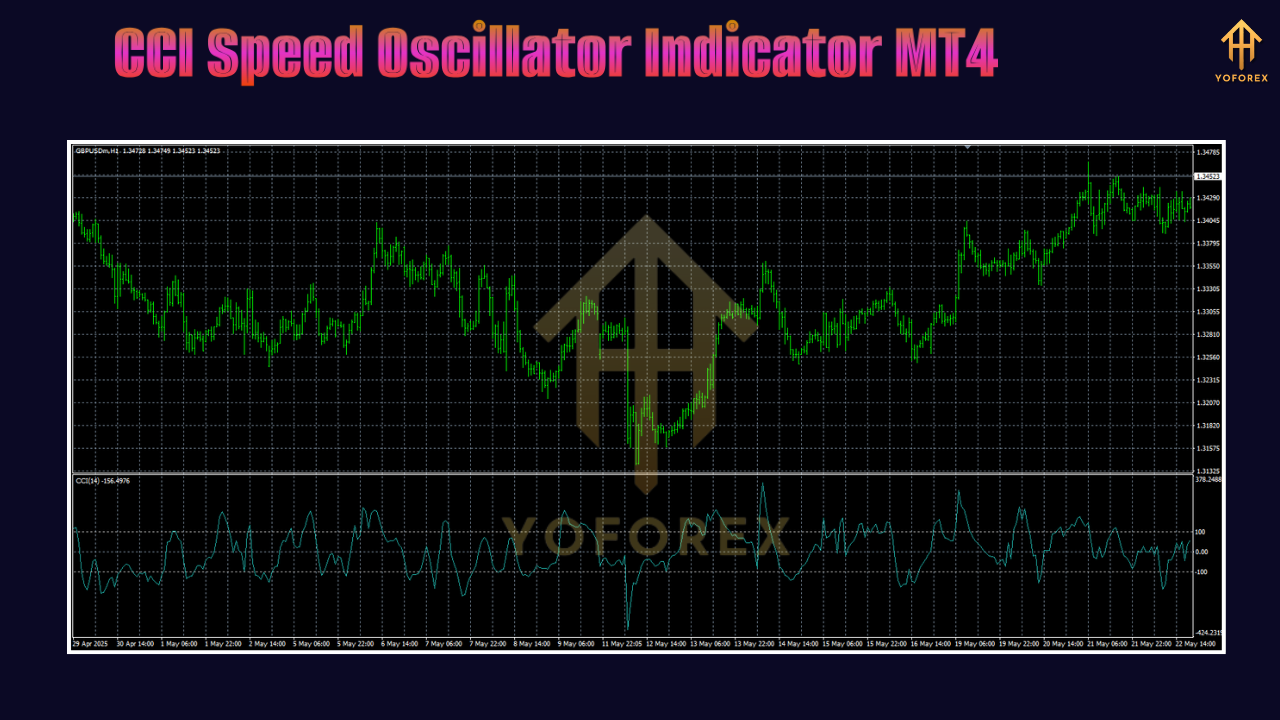
How the CCI Speed Oscillator Works
At its core, the indicator calculates two series:
-
CCI Line:
-
Formula: (Typical Price – SMA of Typical Price) / (0.015 × Mean Deviation)
-
Highlights overbought/oversold readings, with standard thresholds at +100 and -100.
-
-
Speed Filter:
-
Measures the rate of change of the CCI itself over a user-defined period.
-
Fast upward momentum shows as green histogram bars (or line above zero), while deceleration appears red (or below zero).
-
Together, these series give you a refined view: only when both momentum is extreme and accelerating does the indicator flash a strong signal. This dual-confirmation approach greatly reduces whipsaws, making your entries and exits more reliable.
Installing & Configuring on MT4
-
Download the Indicator:
– Grab theCCI_Speed_Oscillator.ex4file from your chosen source. -
Copy to MT4 Folder:
– In MT4, go to File → Open Data Folder → MQL4 → Indicators.
– Paste the.ex4file here. -
Restart MT4:
– Close and reopen MetaTrader 4 so the new indicator appears. -
Attach to Chart:
– In the Navigator panel, find “CCI Speed Oscillator” under Indicators.
– Drag it onto your preferred chart and timeframe. -
Input Settings:
-
CCI Period: Default 14 (adjust to taste)
-
Speed Period: Default 5 (shorter for scalping, longer for swing trading)
-
Thresholds: Set upper/lower speed limits if you want only the strongest moves
-
Alert Options: Enable pop-ups, emails, or mobile push notifications
-
A recommended starting point is CCI 14 with Speed 5 on the M15 chart. From there, you can tweak the parameters based on your trading style and the instrument’s volatility.
Trading Strategies & Use Cases
1. Trend Confirmation
Use the CCI Speed Oscillator Indicator MT4 to confirm breakouts. When price breaks a key level and the speed histogram turns positive, that’s your green light to enter.
2. Scalping Entries
On low timeframes (M1–M5), wait for the speed histogram to cross above zero while CCI > +100. This precise timing helps you catch quick 5–10 pip moves.
3. Swing Trading Pullbacks
In a strong uptrend, look for speed to dip below zero briefly (momentary deceleration) before shooting back up—ideal for buying a dip.
4. Divergence Detection
If price makes a new high but the speed oscillator fails to confirm (lower histogram peak), you’ve spotted bearish divergence—a warning of a potential reversal.
5. Multi-Timeframe Analysis
Check the indicator on H1 for trend direction and use M15 signals for precise entries. This top-down approach filters out noise and aligns you with the bigger picture.
Tips for Optimizing Your Settings
• Adjust to Volatility: More volatile pairs (like EUR/JPY) may require shorter speed periods to capture rapid swings.
• Combine with Moving Averages: A 50-period EMA can act as a trend filter—take only signals in the direction of the EMA slope.
• Avoid Flat Markets: When CCI hovers between -20 and +20 and speed is muted, stay sidelined.
• Test on Demo First: Always validate new parameters on a demo account to fine-tune without risking real capital.
• Use Alerts Sparingly: Too many alerts can lead to fatigue—set them only for your highest-probability setups.
Conclusion
The CCI Speed Oscillator Indicator MT4 offers a fresh twist on classic momentum analysis, giving traders the ability to focus on the sharpest market moves and filter out the noise. Whether you’re scalping small timeframes or swing trading on H4, its dual-layer approach can sharpen your entries and exits, reduce false signals, and ultimately boost your confidence in real-time decision-making. Give it a whirl on your next demo session and see how quickly you can spot opportunities others might miss.
Happy Trading!
Professional Assets
Unlock the expert tools and configurations mentioned in this article.
Get Files NowSecure Gateway • Verified by YoPips
Aditi Roy
Financial analyst and professional trader dedicated to cracking the code of forex markets. Join our community for daily insights and expert tool reviews.
Never miss a market crack.
Join 15,000+ traders receiving our weekly breakdown of elite tools and strategies.
No spam. Just high-impact trading insights.